Donations API guide
Install AI tools
Give your assistant up-to-date guidance for our APIs, with our plugin or without it.
The plugin is still under development. See the AI tools page for details.
- Claude Code
- Cursor
- Codex
- Without installing
Run both commands, in order.
claude plugin marketplace add vippsas/agent-toolkit
claude plugin install vipps-developer@agent-toolkit
Open Settings, then Plugins.
Add vippsas/agent-toolkit as a plugin marketplace, then install the "vipps-developer" plugin.
For the app, add the marketplace "vippsas/agent-toolkit" and then install "vipps-developer". For the CLI, run the following commands.
codex plugin marketplace add vippsas/agent-toolkit
codex plugin add vipps-developer@agent-toolkit
Paste this into any assistant.
Read https://github.com/vippsas/agent-toolkit/blob/main/plugins/vipps-developer/README.md for Vipps MobilePay integration guidance.
For troubleshooting, see the full instructions.
Once you have access to the Donations product, you can use this API to pull donation payment reports and receive real-time webhook notifications about agreement changes.
Integration steps
For a step-by-step walkthrough of getting your keys, requesting an access token, and calling the Donations API endpoints, see the Quick start guide.
The Donations API is not available in the test environment. All requests in this guide use the production server, https://api.vipps.no.
How to get the API keys
- Merchants
- Partners
Use a merchant-level API client to authenticate with the Donations API. Unlike other Vipps MobilePay API clients, this operates at the organization level rather than the sales unit level. A Client ID and Client Secret will be generated for you to use when you request an access token.
To get the merchant-level keys:
Generate the API client from the Donations tab in the developer portal. The tab is only visible after you have been approved for the Donations product.
-
Click For developers in the left sidebar.
-
Select the Donations tab.
-
Click Generate, enter a name that identifies the client, and click Generate credentials.
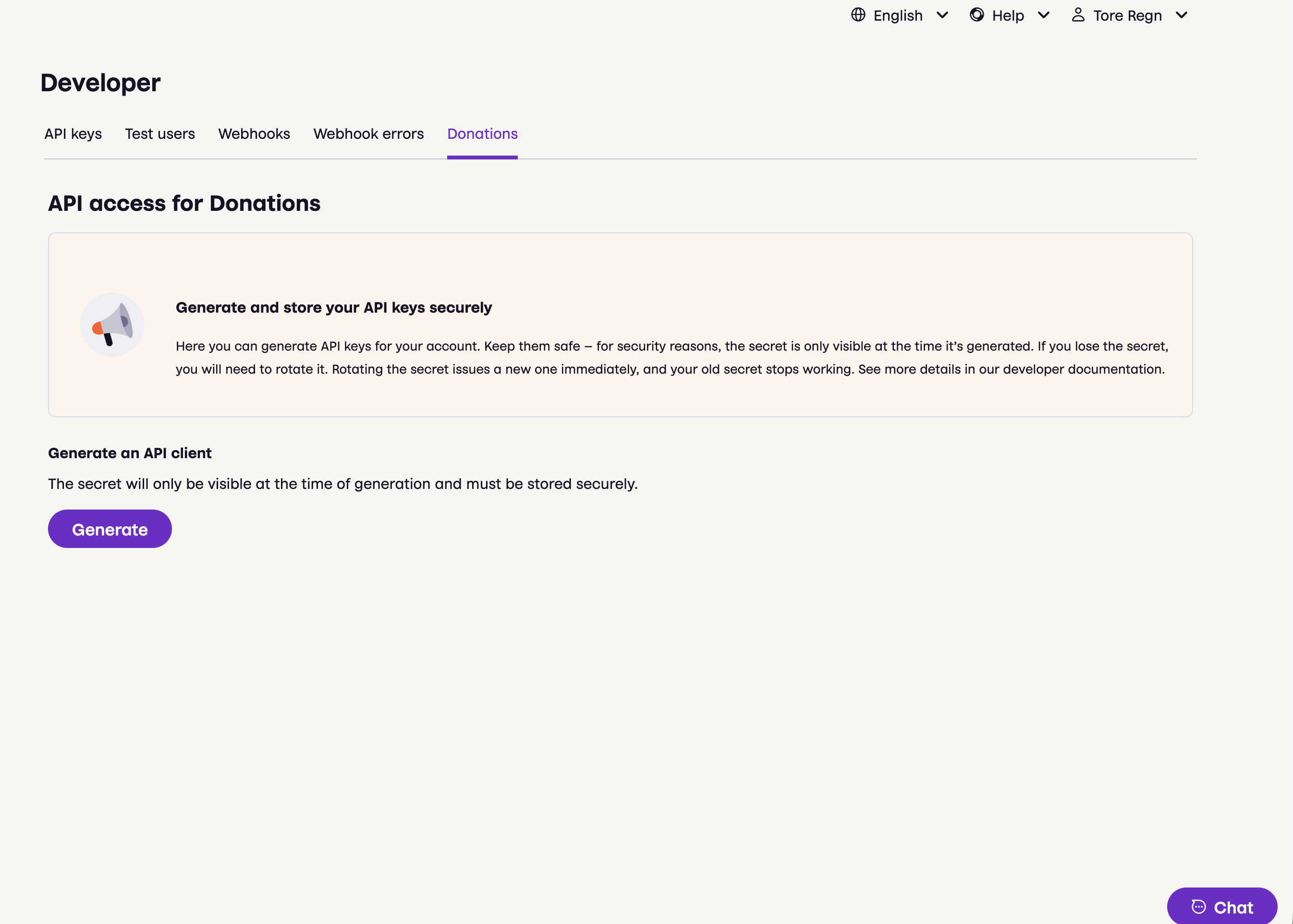
Screenshot: Developer portal "Donations" tab showing "API access for Donations" with a "Generate an API client" section and a Generate button.
-
Copy your credentials and store them somewhere safe. The secret is shown only once.
If you lose the secret, click Regenerate secret. Your old secret stops working immediately, so update it in your system right away.
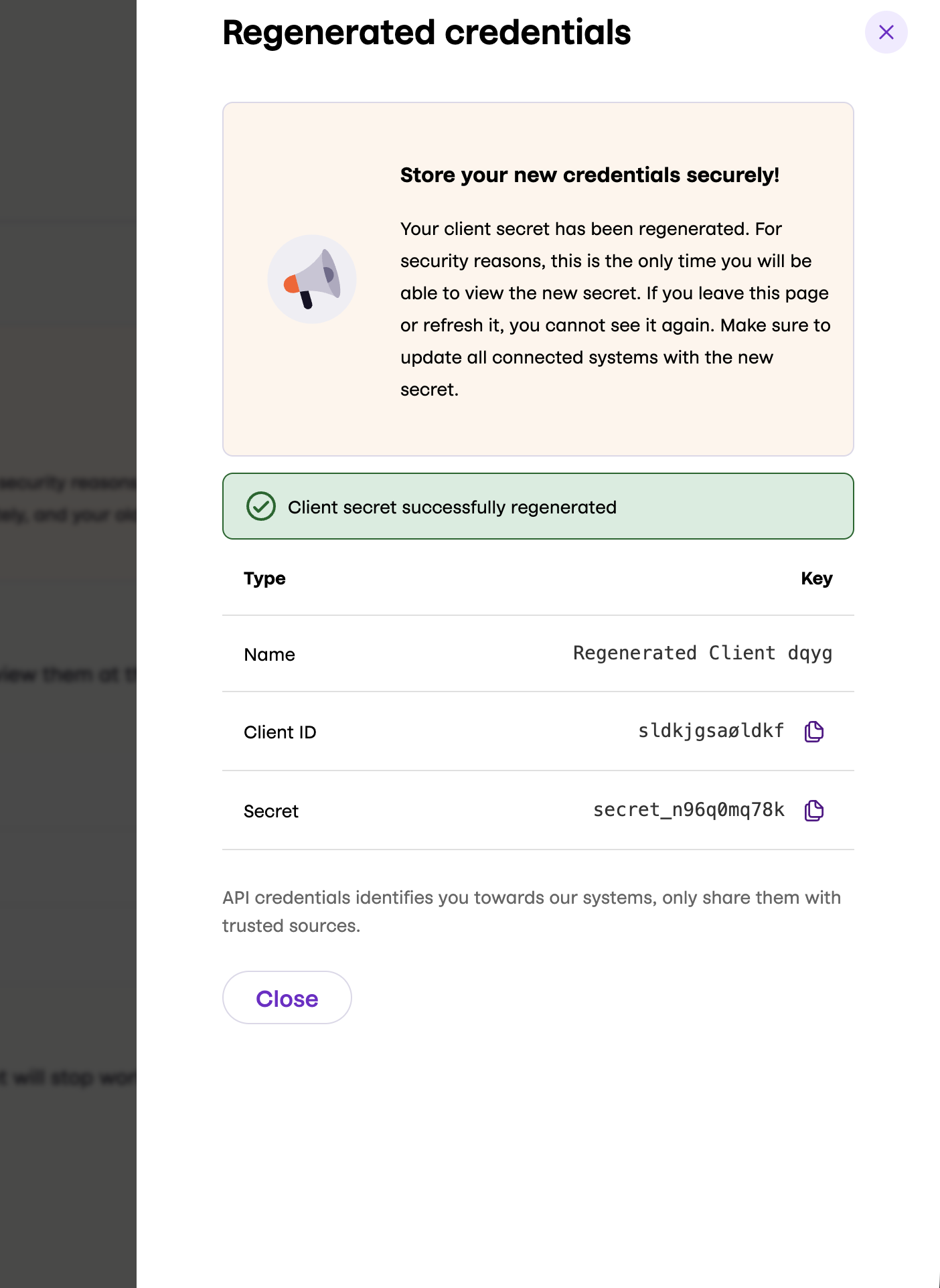
Screenshot: "Regenerated credentials" dialog showing a success message ("Client secret successfully regenerated") and a table with Name, Client ID, and Secret fields displayed. A warning says this is the only time the secret will be visible.
To manage multiple clients:
You can have more than one merchant-level API client, for example if you have multiple systems, or to rotate credentials without downtime.
- To add a client, click Add client on the Donations tab and follow the same steps as for the first one.
- To view a different client, select it in the Client dropdown.
- To delete a client, select it and click Delete client. The credentials stop working immediately, and this cannot be undone.
To change credentials without downtime, add a new client, update your system to use its credentials, and then delete the old client.
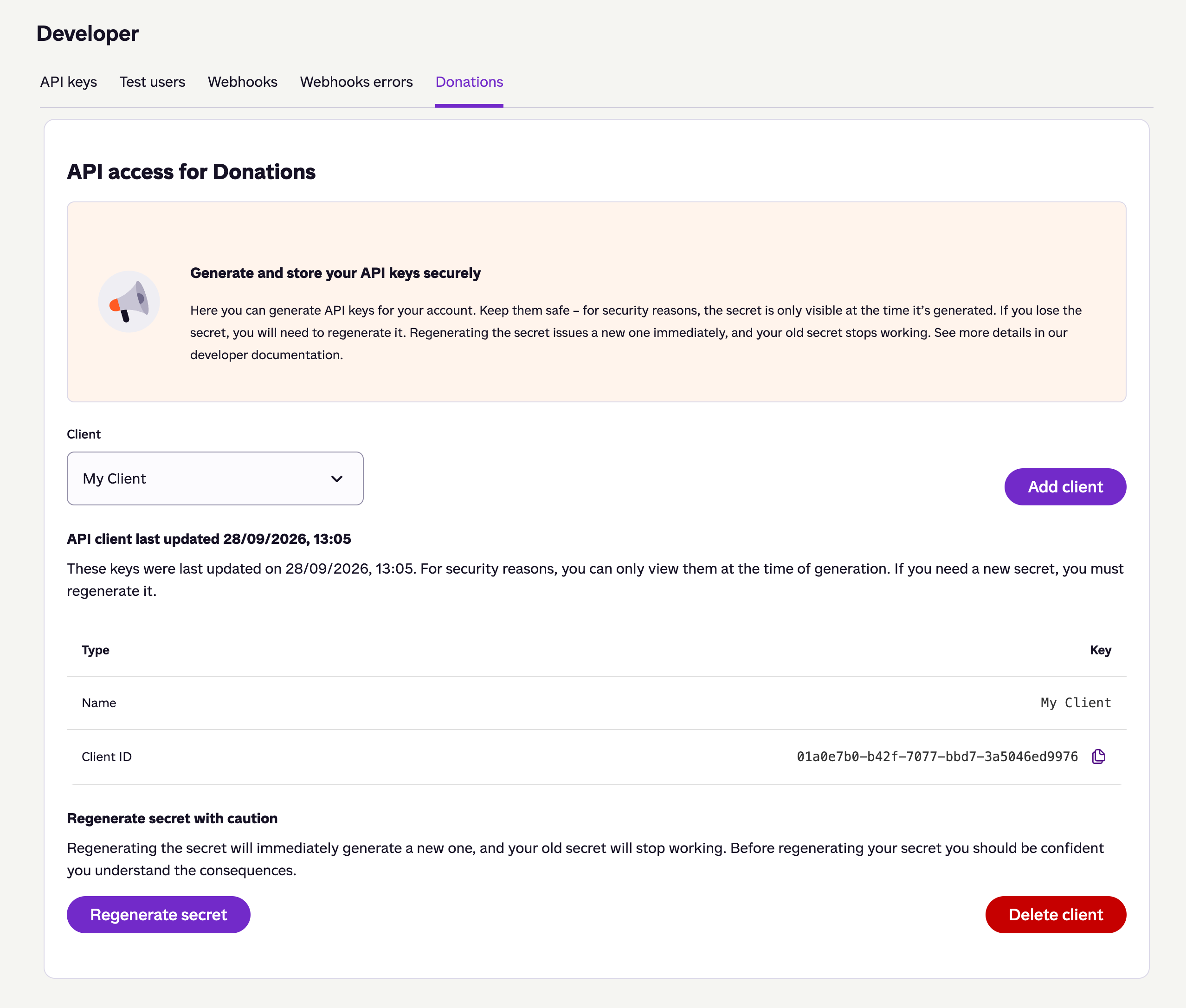
Screenshot: "Donations" tab after key generation showing an "Add client" button, the API client, and a caution warning with "Regenerate secret" and "Delete client" buttons.
If you integrated earlier and are using keys from a Recurring donations sales unit, use your sales unit API keys with standard authentication instead. That is the same flow partners use, shown in the Partners tab of Step 2 - Get an access token.
You don't need separate Donations keys. Use the partner keys you already have — one set works across all the merchants you manage.
If you don't have partner keys yet, see How to get API keys.
Unlike merchant-level keys, partner keys use standard authentication. See Step 2 - Get an access token for an example request.
You only get data for the donations sales units you have been granted access to — see Partner-specific behavior.
Endpoints
Include the access token in the Authorization header of each request.
The following endpoints are available:
| Endpoint | Description |
|---|---|
GET:/donations/v1/reports/payments | Get a list of all single and recurring donations made to a merchant in a given interval |
GET:/donations/v1/agreements/{agreementId} | Get detailed information about a specific agreement |
POST:/donations/v1/agreements/{agreementId}/stop | Stop an agreement |
POST:/donations/v1/agreements/{agreementId}/request-amount-change | Ask the donor to approve a new amount |
GET:/donations/v1/agreements/{agreementId}/change-requests/{requestId} | Get the status of a change request |
Get a list of donation payments
Use GET:/donations/v1/reports/payments to retrieve all your donation payments as an array of payment objects.
Partner-specific behavior
When calling this endpoint as a partner:
- The response only includes payments for donations sales units the partner has been granted access to.
- If
recipientHandlesis included, every handle must be both valid and accessible for that partner. - If one or more requested
recipientHandlesare not accessible (or not found), the endpoint returns403 Forbidden.
Send GET:/donations/v1/reports/payments with your access token and from/to query parameters to specify the time interval.
For example:
curl -X GET https://api.vipps.no/donations/v1/reports/payments?from=2025-10-08T06:01:09.1234567Z&to=2030-06-30T23:59:59.9999999Z
-H "Authorization: Bearer YOUR-ACCESS-TOKEN"
A successful response includes the date range and a payments array, where each entry contains payer, amount, currency, and capture time.
For example:
{
  "from": "2025-10-24T14:15:22Z",
  "to": "2025-10-24T14:15:22Z",
  "payments": [
    {
      "externalReference": "spring-promotion-2025",
      "agreementId": "79458f91-82b5-4c38-a886-56df6a6b7980",
      "message": "string",
      "payer": {
        "name": "Ada Lovelace",
        "phoneNumber": "4712345678"
      },
      "capturedAt": "2025-10-24T14:15:22Z",
      "pspReference": "11268125611",
      "transactionReference": "11268125611",
      "recipientHandle": "api:922061",
      "amount": "50001",
      "currency": "NOK"
    }
  ]
}
Using the Report API
Merchants can also use the Report API with the same merchant-level keys to retrieve settlement and ledger data alongside their donations data.
See Authenticating to the Report API for details.
Payments report best practices
The payments report endpoint (GET:/donations/v1/reports/payments) uses timestamp-based batching for efficient data retrieval.
Batching
Key concepts
- Data update frequency: There is no need to poll for new data more often than once a minute.
- Payload Size Limits: The API has built-in limits on response payload size for performance reasons
- No Guarantee of Complete Intervals: You are not guaranteed to receive all payments within a given time interval in a single request
- Timestamp-Based Pagination: Use the latest timestamp from the previous response as the
fromparameter for the next request - Dynamic Payload Size: The number of payment entries returned in each response may vary and is subject to change. Do not implement logic that depends on a specific number of payments per response.
Recommended implementation
- Start with your desired time range: Set both
fromandtoparameters for your initial request - Process the response: Handle all payments returned in the response
- Check for more data: If the response contains payments, use the latest
capturedAttimestamp as the newfromparameter - Continue pagination: Make subsequent requests with the updated
fromparameter until a response contains no payments that you have not already processed. This means you have reached the end of the currently available data.
Important considerations
- Timestamp Precision: Always use the exact
capturedAttimestamp from the response to avoid missing payments - Duplicate Handling: Implement logic to handle duplicate payments that may appear across different payloads. The last payment of the previous payload will be included if using the exact timestamp.
- End of available data: As long as you use the latest
capturedAtfrom the previous response asfrom, the next response always contains at least one payment as thefromparameter is inclusive. Do not wait for an emptypaymentsarray. When a response only contains payments you have already processed, you are at the end of the currently available data.
Webhooks integration
Receive real-time notifications when donation agreements are started, stopped, or changed. Register your webhook URL as described in the Webhooks API guide.
Partners can register donations.* webhooks using their partner-level API keys.
A partner-level registration without a Merchant Serial Number (MSN) covers donations events for all sales units connected to the partner, including sales units added in the future.
See Partner webhooks for details.
Agreement webhook events
Webhook event types for donation agreements:
| Event type | Description |
|---|---|
donations.agreement.started.v1 | Donation agreement has been started |
donations.agreement.stopped.v1 | Donation agreement has been stopped |
donations.agreement.withdrawal-day-changed.v1 | Donation agreement withdrawal day has been changed |
donations.agreement.amount-changed.v1 | Donation agreement amount has been changed |
Create a webhook
Register your webhook endpoint to receive notifications about agreement events:
curl -X POST https://api.vipps.no/webhooks/v1/webhooks \
-H "Authorization: Bearer YOUR-ACCESS-TOKEN" \
-H "Content-Type: application/json" \
--data '{
    "url": "YOUR-CALLBACK-URL",
    "events": ["donations.agreement.started.v1"]
}'
A successful response confirms the registration:
{
   "id":"497f6eca-6276-4993-bfeb-53cbbbba6f08",
   "secret":"090a478d-37ff-4e77-970e-d457aeb26a3a"
}
Agreement webhook payloads
Started event payload
When a donation agreement is started, you will receive the following payload:
| Field name | Type | Description | Example |
|---|---|---|---|
agreementId | string | ID of the donation agreement | 2518f497-bfad-43a6-8914-fd0168a6c221 |
startedAt | ISO 8601 UTC date | When the agreement was started | 2026-01-31T17:26:50.8789251+00:00 |
Example payload:
{
  "agreementId": "2518f497-bfad-43a6-8914-fd0168a6c221",
  "startedAt": "2026-01-31T17:26:50.8789251+00:00"
}
Stopped event payload
When a donation agreement is stopped, you will receive the following payload:
| Field name | Type | Description | Example |
|---|---|---|---|
agreementId | string | ID of the donation agreement | 2518f497-bfad-43a6-8914-fd0168a6c221 |
stoppedAt | ISO 8601 UTC date | When the agreement was stopped | 2026-01-31T17:26:50.8789251+00:00 |
Example payload:
{
  "agreementId": "2518f497-bfad-43a6-8914-fd0168a6c221",
  "stoppedAt": "2026-01-31T17:26:50.8789251+00:00"
}
Withdrawal day changed event payload
When the withdrawal day of a donation agreement is changed, you will receive the following payload:
| Field name | Type | Description | Example |
|---|---|---|---|
agreementId | string | ID of the donation agreement | 34580d79-0628-4ed5-bb0a-75a6f2a6fae1 |
changedAt | ISO 8601 UTC date | When the withdrawal day was changed | 2026-02-15T17:00:22.1234567Z |
withdrawalDay | integer | New withdrawal day (1–28) | 12 |
nextPeriodKey | string (optional) | Billing period key for the next withdrawal. Format: YYYY-MM (e.g. March 2026 is 2026-03). Omitted or null when the next billing period is not yet determined (e.g. before the first schedule has been initialized). | 2026-03 |
Example payload (when next period is known):
{
  "agreementId": "34580d79-0628-4ed5-bb0a-75a6f2a6fae1",
  "changedAt": "2026-02-15T17:00:22.1234567Z",
  "withdrawalDay": 12,
  "nextPeriodKey": "2026-03"
}
When the next billing period is not yet determined, nextPeriodKey may be omitted or null.
Amount changed event payload
When the amount of a donation agreement is changed, you will receive the following payload:
| Field name | Type | Description | Example |
|---|---|---|---|
agreementId | string | ID of the donation agreement | 34580d79-0628-4ed5-bb0a-75a6f2a6fae1 |
changedAt | ISO 8601 UTC date | When the amount was changed | 2026-02-15T17:00:22.1234567Z |
amount | object | New amount | See below |
amount.value | integer | Amount in minor units (e.g. øre/cents) | 20000 |
amount.currency | string | ISO 4217 currency code | DKK |
requestId | string (optional) | Your requestId from the amount change request that the donor approved. Omitted when the donor changed the amount themselves. | crm-upgrade-42 |
Example payload:
{
  "agreementId": "34580d79-0628-4ed5-bb0a-75a6f2a6fae1",
  "changedAt": "2026-02-15T17:00:22.1234567Z",
  "amount": {
    "value": 20000,
    "currency": "DKK"
  }
}
Example payload, if the origin of the change is a change request:
{
  "agreementId": "34580d79-0628-4ed5-bb0a-75a6f2a6fae1",
  "changedAt": "2026-02-15T17:00:22.1234567Z",
  "amount": {
    "value": 20000,
    "currency": "DKK"
  },
  "requestId": "crm-upgrade-42"
}
For more details about webhooks, see the Webhooks API guide.
Get agreement details
After receiving a webhook notification, retrieve full agreement details using GET:/donations/v1/agreements/{agreementId}.
For example:
curl -X GET https://api.vipps.no/donations/v1/agreements/2518f497-bfad-43a6-8914-fd0168a6c221
-H "Authorization: Bearer YOUR-ACCESS-TOKEN"
The response includes payer information, schedule, and amount.
For example:
{
  "id": "2518f497-bfad-43a6-8914-fd0168a6c221",
  "recipientHandle": "NO:6666",
  "startedAt": "2026-01-31T17:26:50.8789251+00:00",
  "schedule": {
    "interval": "MONTHLY",
    "withdrawalDay": 10
  },
  "amount": {
    "currency": "NOK",
    "value": 2300
  },
  "payer": {
    "firstName": "Ada",
    "lastName": "Lovelace",
    "phoneNumber": "4712345678",
    "address": {
      "country": "NO",
      "region": "Oslo",
      "postalCode": "0154",
      "addressLine1": "Robert Levins gate 5"
    },
    "email": "user@example.com",
    "emailVerified": true
  }
}
Response behavior:
200 OKwhen the agreement exists and the caller has access to it.404 Not Foundif the agreement does not exist.
For more details, see GET:/donations/v1/agreements/{agreementId} in the spec.
Manage agreements
Stop an agreement, or ask the donor to approve a new amount.
Stop an agreement
Stop an active agreement using POST:/donations/v1/agreements/{agreementId}/stop.
Response behavior:
200 OKwhen the agreement is stopped.200 OKif the agreement is already stopped (idempotent).404 Not Foundif the agreement does not exist.
Request an amount change
Use POST:/donations/v1/agreements/{agreementId}/request-amount-change to ask
a donor to change the amount of an active agreement. A typical use is an upgrade campaign, where you call a monthly
donor and ask them to increase the amount.
The request does not change the agreement. The donor gets a push notification, opens the app, and approves or declines the exact amount you requested. The amount only changes if the donor approves.
The flow:
- Send the request with a
requestIdof your choice and the new amount. - The donor gets a push notification and approves or declines the amount in the app.
- Poll the change request with your
requestIdto see the outcome. - When the donor approves, the agreement amount is updated and you get the
donations.agreement.amount-changed.v1webhook with yourrequestId.
The donor has 1 hour to respond before the request expires.
The request body:
requestId: Your own ID for the request, for example the ID from your CRM system. It must be 1–128 characters and can only contain letters (A-Z,a-z), digits, dots, hyphens, and underscores.amount: Amount object, containing avalueand acurrency. Thevalueis the new amount in minor units (øre for NOK and DKK, cents for EUR). For example,20000= 200 NOK. It must be greater than zero, and thecurrencymust match the agreement. The new amount can be higher or lower than the current amount.
An agreement can only have one open change request. If you send a new request with a different requestId, it
replaces the open one, and the old request expires.
The requestId makes the request safe to retry; it is idempotent per agreement. Do not reuse a
requestId for a different amount on the same agreement.
Response behavior:
202 Acceptedwhen the request is recorded, or when it is a retry of an earlier request. There is no response body.400 Bad Requestif therequestIdis invalid, the amount is not greater than zero, or the currency does not match the agreement.403 Forbiddenif the access token does not belong to a merchant or a partner.404 Not Foundif the agreement does not exist.409 Conflictif the agreement is not active, or therequestIdhas already been used with a different amount.
Get the status of a change request
Use GET:/donations/v1/agreements/{agreementId}/change-requests/{requestId}
with your own requestId to follow up on a request.
The response has the same fields for every status:
{
  "agreementId": "2518f497-bfad-43a6-8914-fd0168a6c221",
  "requestId": "crm-upgrade-42",
  "status": "Requested",
  "type": "CHANGE_AMOUNT",
  "amount": {
    "currency": "NOK",
    "value": 20000
  },
  "requestedAt": "2026-06-05T06:00:00Z",
  "expiresAt": "2026-06-05T07:00:00Z"
}
The status field has one of these values:
| Status | Description |
|---|---|
Requested | Waiting for the donor to respond. |
Approved | The donor approved the new amount. The response also includes decidedAt. |
Declined | The donor declined. The amount is unchanged. The response also includes decidedAt. |
Expired | The request can no longer be approved. The response also includes expiredAt. |
A request expires when:
- The donor has not responded within 1 hour.
- You send a new request with a different
requestIdfor the same agreement. - The agreement is stopped.
- The donor changes the amount themselves in the app.
The status is updated shortly after each change, not instantly. For example, a request can still show Requested
for a short time after it has expired or been replaced. After Approved, the new amount is written to the agreement
shortly after. To confirm it, wait for the donations.agreement.amount-changed.v1 webhook or
get the agreement details.
The donations.agreement.amount-changed.v1 webhook includes your requestId when the change comes from an approved
request, so you can match it to your request. There are no webhooks for declined or expired requests. Use this
endpoint to see those outcomes.
Response behavior:
200 OKwhen the change request exists on the agreement and the caller has access to it, whatever its status.403 Forbiddenif the access token does not belong to a merchant or a partner.404 Not Foundif the agreement or the change request does not exist, or therequestIdbelongs to another agreement.