Login Connect
Install AI tools
Give your assistant up-to-date guidance for our APIs, with our plugin or without it.
The plugin is still under development. See the AI tools page for details.
- Claude Code
- Cursor
- Codex
- Without installing
Run both commands, in order.
claude plugin marketplace add vippsas/agent-toolkit
claude plugin install vipps-developer@agent-toolkit
Open Settings, then Plugins.
Add vippsas/agent-toolkit as a plugin marketplace, then install the "vipps-developer" plugin.
For the app, add the marketplace "vippsas/agent-toolkit" and then install "vipps-developer". For the CLI, run the following commands.
codex plugin marketplace add vippsas/agent-toolkit
codex plugin add vipps-developer@agent-toolkit
Paste this into any assistant.
Read https://github.com/vippsas/agent-toolkit/blob/main/plugins/vipps-developer/README.md for Vipps MobilePay integration guidance.
For troubleshooting, see the full instructions.
This feature is under development, so changes may occur.
Login Connect enables a merchant to do card enrollment and card recognition. Login Connect builds on the standard Login flow, a user logs
in with Vipps or MobilePay and consents to share their cards with the merchant.
Login Connect has three parts:
- Card enrollment: The user logs in and consents to share their cards. You get a webhook when the cards are enrolled.
- Card recognition: Every time an enrolled card is used in one of your stores, you get a transaction notification on your webhook.
- Manage enrolled cards: Use the Login Connect Merchant API to show the user their enrolled cards and let them remove cards.
The user's sub connects all three parts. The sub you receive from userinfo during card enrollment is the same sub
you receive in every transaction notification, and the same sub you use to manage the user's cards.
Prerequisites
Before you start, make sure you have the following in place:
- A working Login integration. See Log in from websites or Login from a mobile app.
- The
loginConnectscope enabled for your sales unit. See Scopes. - A webhook registered with the Webhooks API on your sales unit, subscribed to the Login Connect event types:
| Name | Event type |
|---|---|
| Card enrollment completed | login.connect.card-enrollment.completed.v1 |
| Transaction notification | login.connect.transaction.notification.v1 |
The Webhooks API returns a secret used to verify the HMAC signature on each incoming webhook. Store it securely, and verify the signature before trusting any payload. See How to authenticate the webhook event.
Card enrollment
In the card enrollment flow, the user logs in with Vipps or MobilePay and consents to share their cards with you. We enroll the shared cards and tell you the result on your webhook.
Card enrollment flow
- Merchant starts a login with the
loginConnectscope. - Vipps MobilePay asks the customer to log in and consent in the Vipps or MobilePay app.
- Customer consents to share cards and user data.
- Merchant exchanges the code for tokens at the token endpoint.
- Merchant calls the userinfo endpoint.
- Vipps MobilePay returns sub, user data, and login_connect_cards.
- Vipps MobilePay enrolls the cards.
- Vipps MobilePay sends the card enrollment completed webhook with sub and the list of cards to the merchant.
1. Start the login with the loginConnect scope
Login Connect is an extension of the standard Login flow, so the integration is mostly the same as a regular Login integration.
The main difference is that the merchant must request the loginConnect scope to trigger the Login Connect flow.
Request it together with the other scopes you need, such as openid, name, and email.
The user will be prompted to consent to share their cards with the merchant during the login flow. The user chooses which cards and accounts to share:
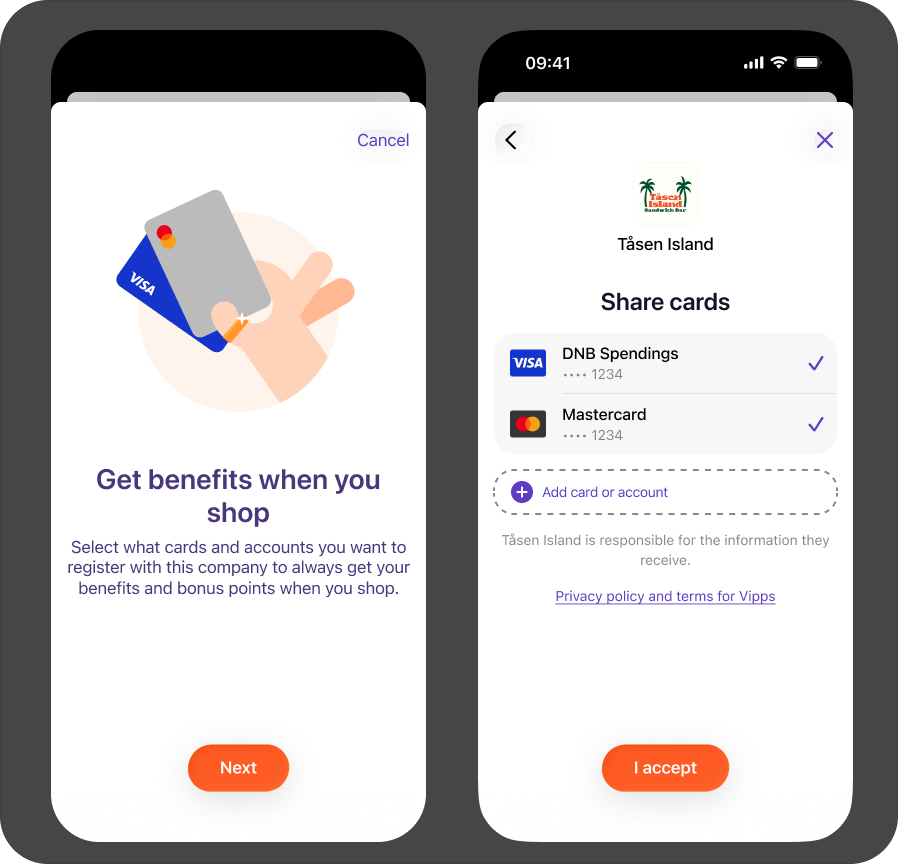
Login Connect consent screens: an intro screen explaining the benefits ("Get benefits when you shop"), followed by a screen where the user selects which cards and accounts to share.
2. Get tokens and fetch userinfo
Complete the login as usual: exchange the code for tokens, then call the userinfo endpoint with the access token.
The userinfo response will include a login_connect_cards array, where each entry has a
cardId identifying a payment source the user consented to share. For example:
{
    "sub": "126684df-c056-4625-821d-f2905febe3f9",
    "login_connect_cards": [
        {
            "cardId": "a91b26e4-a833-4618-84f8-c5e2a94545bb"
        },
        {
            "cardId": "0736ffb6-7b12-4041-a3fd-a75ec13451ec"
        },
        {
            "cardId": "54f1a590-11f7-4614-bac8-dadac6cd665c"
        }
    ]
}
| Field | Description |
|---|---|
sub | The user's unique ID for your sales unit. Store it with the user's profile, since it is the key that links transaction notifications back to this user. |
login_connect_cards[].cardId | Identifies a payment source the user consented to share. The card enrollment completed webhook uses the same value as cards[].cardId. |
3. Receive the card enrollment completed webhook
After the login is completed, we enroll the shared cards. When enrollment is done, we send one
login.connect.card-enrollment.completed.v1 event to your webhook for the user. The event lists every card the
user shared, with the enrollment result for each card.
| Field | Type | Description |
|---|---|---|
sub | String | The user's unique ID for your sales unit. Same as sub in the userinfo response. |
sessionId | String | Identifies the login session the enrollment belongs to. |
cards | Array | One entry per card the user shared. |
cards[].cardId | String | The enrolled card. Same as cardId in the userinfo response. |
cards[].cardLinkStatus | String | The result of the enrollment. LINKED means the card is enrolled and can be recognized. FAILED means the card could not be enrolled. |
cards[].timestamp | String | When the enrollment of this card completed, in ISO 8601 UTC format. |
Example:
{
  "sub": "126684df-c056-4625-821d-f2905febe3f9",
  "sessionId": "7e5f72fc-4986-48dc-9505-f010b869d2a7",
  "cards": [
    {
      "cardId": "a91b26e4-a833-4618-84f8-c5e2a94545bb",
      "cardLinkStatus": "LINKED",
      "timestamp": "2026-09-08T12:30:00Z"
    },
    {
      "cardId": "0736ffb6-7b12-4041-a3fd-a75ec13451ec",
      "cardLinkStatus": "FAILED",
      "timestamp": "2026-09-08T12:30:01Z"
    }
  ]
}
A card with status FAILED will not trigger transaction notifications. The user can share the card again
in a later login.
Card recognition
Once a card is enrolled, we notify you every time the user pays with that card in one of your stores. You do not need to change anything in your stores or payment terminals.
Card recognition flow
- Customer pays with an enrolled card in the merchant's store.
- The payment is completed through the card network and reaches Vipps MobilePay.
- Vipps MobilePay checks that the user's consent is still valid.
- Vipps MobilePay sends a transaction notification webhook with sub and cardId to the merchant.
1. Receive the transaction notification
When an enrolled card is used in one of your stores, we send a login.connect.transaction.notification.v1 event to
the webhook you registered in Prerequisites.
| Field | Type | Description |
|---|---|---|
sub | String | The user's unique ID for your sales unit. Same as sub from the card enrollment. |
cardId | String | The enrolled card that was used. Same as cards[].cardId in the card enrollment completed webhook. |
msn | String | The merchant serial number of the sales unit where the card was used. |
amount | Object | The transaction amount, with value in minor units and currency as an ISO 4217 code. |
timestamp | String | When the transaction was made, in ISO 8601 UTC format. |
Example:
{
  "sub": "126684df-c056-4625-821d-f2905febe3f9",
  "cardId": "a91b26e4-a833-4618-84f8-c5e2a94545bb",
  "msn": "123456",
  "amount": {
    "value": 24900,
    "currency": "NOK"
  },
  "timestamp": "2026-09-08T15:42:10Z"
}
2. Match the notification to your customer
Use sub to look up the customer in your own systems. It is the same sub you received from userinfo
when the user completed the card enrollment, so store it with the user's profile at that point.
Note that sub is unique per sales unit. Different sales units get different sub values for the same user,
so match on the sub you received for the sales unit the login was made with.
Manage enrolled cards
Use the Login Connect Merchant API to show the user their enrolled cards on your website or in your app,
and to let them remove a card or leave Login Connect completely. The user is identified by the sub from userinfo.
All requests use the base path https://api.vipps.no/login-connect/v1 and require a merchant access token in the
Authorization header. See the Access token API.
Get enrolled cards
Returns the cards currently enrolled for the user for your sales unit. If the user has no enrolled cards,
the response is 200 OK with an empty cards array.
GET https://api.vipps.no/login-connect/v1/users/{sub}/cards
Authorization: Bearer <access token>
Example response:
{
  "cards": [
    {
      "id": "card_01J8Q3K7M2N4P6R9T1V3",
      "scheme": "VISA",
      "maskedPan": "************1234",
      "cardIssuer": "Example Bank",
      "expiryDate": "2028-12"
    },
    {
      "id": "card_01J8Q3K7M2N4P6R9T1W5",
      "scheme": "BANKAXEPT",
      "accountNumber": "12345678901",
      "cardIssuer": "Another Bank"
    }
  ]
}
| Field | Type | Description |
|---|---|---|
id | String | Opaque identifier for the enrolled card. Same as cardId in the webhooks. Do not derive card information from it. |
scheme | String | The card scheme: VISA, MASTERCARD, or BANKAXEPT. |
maskedPan | String | Masked card number suitable for display. Returned for Visa and Mastercard cards. |
accountNumber | String | Account number of the payment source. Returned for BankAxept cards instead of maskedPan. |
cardIssuer | String | Name of the card issuer, when available. |
expiryDate | String | Card expiry date formatted as YYYY-MM, when available. |
Remove an enrolled card
Removes one card from the user's enrollment for your sales unit. The removal takes effect immediately, and you will not receive transaction notifications for that card afterwards.
DELETE https://api.vipps.no/login-connect/v1/users/{sub}/cards/{cardId}
Authorization: Bearer <access token>
The response is 204 No Content. The operation is idempotent, so you get 204 No Content even if the card
was already removed or was never enrolled for this user.
Unenroll a user
Removes the user's Login Connect enrollment for your sales unit, including all their enrolled cards. The removal takes effect immediately.
DELETE https://api.vipps.no/login-connect/v1/users/{sub}
Authorization: Bearer <access token>
The response is 204 No Content. The operation is idempotent, so you get 204 No Content even if the user
was already unenrolled.