Provisioning API
A bank/issuer-oriented service API for initiating a push provisioning flow in the Vipps/MobilePay app.
A prerequisite is for the bank to check the card token status to determine whether a card is registered at Vipps/MobilePay. If it is not, they may offer the user to add the card to Vipps/MobilePay and trigger an app switch to Vipps/MobilePay app to add the card.
See the API specs for more.
Ecom token requester IDs
We recommend checking for status on the following token requester IDs (TRIDs) to determine if a given card is registered in Vipps/MobilePay app. The deprecated TRID can be safely ignored.
| Network | Provider | Token Requester ID | Status |
|---|---|---|---|
| Visa | Vipps | 40010082040 | Active |
| Visa | MobilePay | 40010081524 | Active |
| Mastercard | Vipps (old) | 50134871116 | Deprecated |
| Mastercard | Vipps (new) | 50169178771 | Active |
| Mastercard | MobilePay | 50100496946 | Active |
NFC token requester IDs
We recommend checking the status for the following TRIDs to determine if a card is NFC enrolled via Vipps/MobilePay on a device. Please note that a user may have old devices with active tokens and still want to do NFC enrollment on their current device, so this is not a guaranteed indicator.
| Network | Platform | Token Requester ID |
|---|---|---|
| Visa | iOS | 40010093055 |
| Visa | Android | 40010093056 |
| Mastercard | - | 50179270456 |
NFC enrollment directly via universal link
If the ecom token exists for a given card, but no nfc token, we support nfc enrollment only via direct universal link. This will trigger the nfc enrollment flow in the app directly with the corresponding card.
We expect to eventually deprecate expiry and last-4, for now it's required for legacy reasons.
https://vipps.no/ps/provisioning/push/nfc-enrollment-only?expiry=2028-12&last-4=1234&token-reference=DNITHE123456789123456789&return-url=https%3A%2F%2Fvipps.no
| Query parameter | Required | Description | Example |
|---|---|---|---|
expiry | Yes | Card expiry date in YYYY-MM format. | 2028-12 |
last-4 | Yes | Last four digits of the card number. | 1234 |
token-reference | Yes | Token Unique Reference for the ecom token. | DNITHE123456789123456789 |
return-url | No | URL-encoded return URL. The user is redirected here after the enrollment flow completes. | https%3A%2F%2Fvipps.no |
Flow descriptions
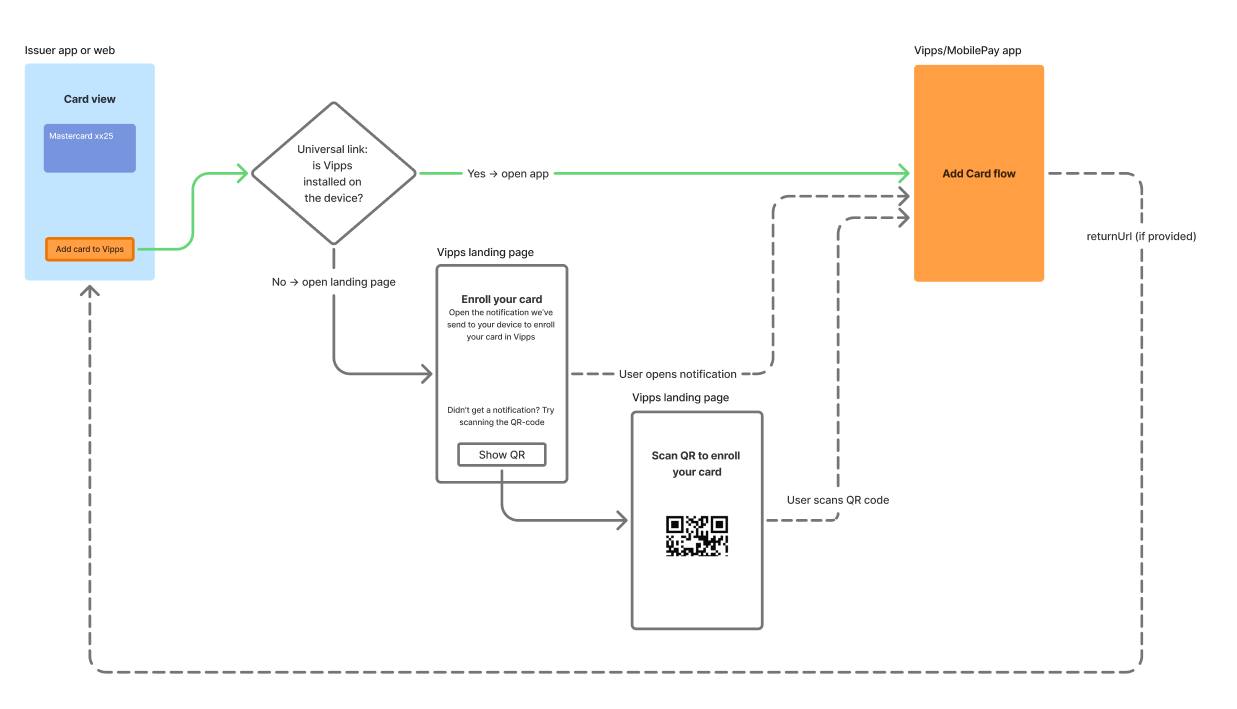
Sequence diagrams
Main flow (single device with app switch)
Alternative flow (dual device)
Auxiliary flows
New Vipps user
If a user does not have a Vipps account, the universal link will always open to a landing page in a native browser requesting the user to install the app and register.
Disabled notifications
If user does not receive a push notification e.g. because they have notifications disabled, there will be an optional fallback on the landing page that offers the user a chance to scan a QR code to start the add-card flow in Vipps.