Provisioning API
Install AI tools
Give your assistant up-to-date guidance for our APIs, with our plugin or without it.
The plugin is still under development. See the AI tools page for details.
- Claude Code
- Cursor
- Codex
- Without installing
Run both commands, in order.
claude plugin marketplace add vippsas/agent-toolkit
claude plugin install vipps-developer@agent-toolkit
Open Settings, then Plugins.
Add vippsas/agent-toolkit as a plugin marketplace, then install the "vipps-developer" plugin.
For the app, add the marketplace "vippsas/agent-toolkit" and then install "vipps-developer". For the CLI, run the following commands.
codex plugin marketplace add vippsas/agent-toolkit
codex plugin add vipps-developer@agent-toolkit
Paste this into any assistant.
Read https://github.com/vippsas/agent-toolkit/blob/main/plugins/vipps-developer/README.md for Vipps MobilePay integration guidance.
For troubleshooting, see the full instructions.
A bank/issuer-oriented service API for initiating a push provisioning flow in the Vipps/MobilePay app.
A prerequisite is for the bank to check the card token status to determine whether a card is registered at Vipps/MobilePay. If it is not, they may offer the user the option to add the card to Vipps/MobilePay and trigger an app switch to the Vipps/MobilePay app to add the card.
See the API specs for more.
❗Note: Users under the age of 15 are not supported for card provisioning in Vipps/MobilePay. Please ensure these users cannot initiate the push provisioning flow.
Ecom token requester IDs
We recommend checking for status on the following token requester IDs (TRIDs) to determine if a given card is registered in the Vipps/MobilePay app. The deprecated TRID can be safely ignored.
| Network | Provider | Token Requester ID | Status |
|---|---|---|---|
| Visa | Vipps | 40010082040 | Active |
| Visa | MobilePay | 40010081524 | Active |
| Mastercard | Vipps (old) | 50134871116 | Deprecated |
| Mastercard | Vipps (new) | 50169178771 | Active |
| Mastercard | MobilePay | 50100496946 | Active |
NFC token requester IDs
We recommend checking the status for the following TRIDs to determine if a card is NFC enrolled via Vipps/MobilePay on a device. Please note that a user may have old devices with active tokens and still want to do NFC enrollment on their current device, so this is not a guaranteed indicator.
| Network | Platform | Token Requester ID |
|---|---|---|
| Visa | iOS | 40010093055 |
| Visa | Android | 40010093056 |
| Mastercard | - | 50179270456 |
NFC enrollment directly via universal link
If the ecom token exists for a given card, but no NFC token, we support NFC enrollment only via direct universal link. This will trigger the NFC enrollment flow in the app directly with the corresponding card.
We expect to eventually deprecate expiry and last4; for now they are required for legacy reasons.
https://qr.vipps.no/ps/provisioning/push/nfc?expiry=2028-12&last4=1234&token-reference=DNITHE123456789123456789&return-url=https%3A%2F%2Fvipps.no
| Query parameter | Required | Description | Example |
|---|---|---|---|
expiry | Yes | Card expiry date in YYYY-MM format. | 2028-12 |
last4 | Yes | Last four digits of the card number. | 1234 |
token-reference | Yes | Token Unique Reference for the ecom token. | DNITHE123456789123456789 |
return-url | No | URL-encoded return URL. The user is redirected here after the enrollment flow completes. | https%3A%2F%2Fvipps.no |
Flow descriptions
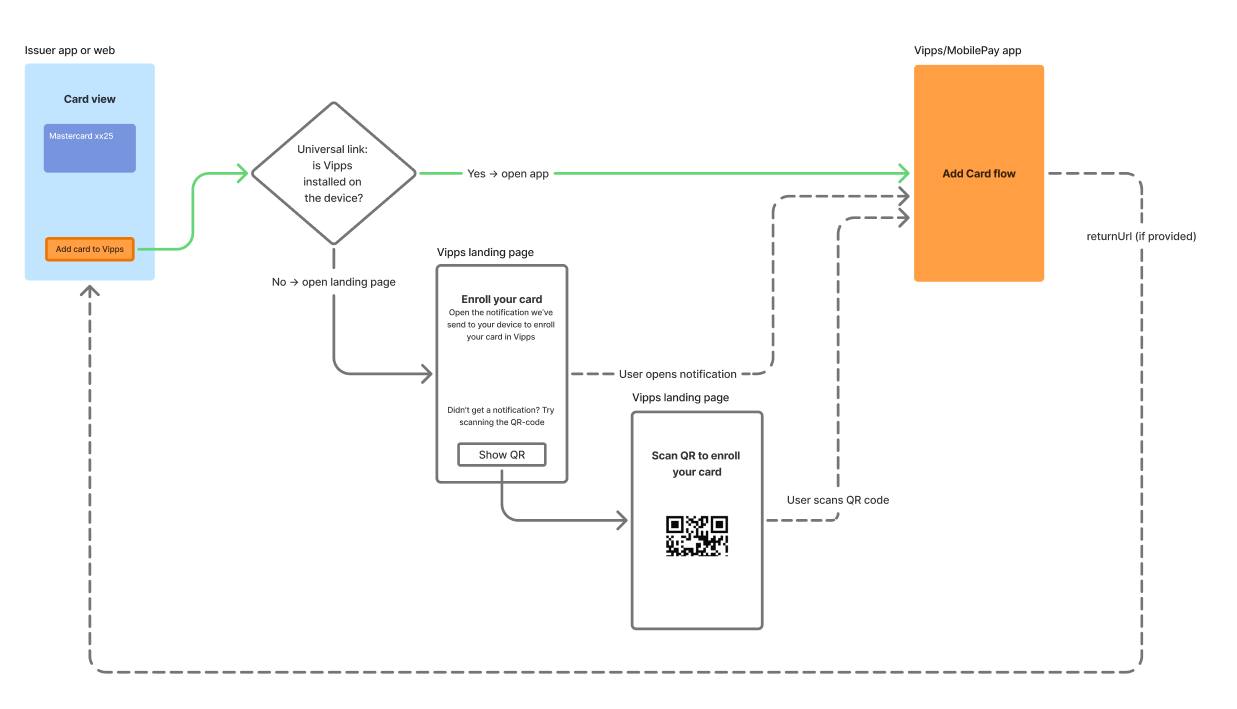
Flow diagram: Overview of provisioning flow options, showing the single-device app-switch path and the dual-device push notification path for adding a card to the Vipps or MobilePay app.
Sequence diagrams
Main flow (single device with app switch)
- User views all cards in the bank app.
- Bank app checks token status with the token service.
- Token service reports the card is not registered at Vipps.
- Bank app offers the user the option to add the card to Vipps.
- User selects "Add card to Vipps".
- Bank app posts card data to the Vipps provisioning service.
- Vipps provisioning service returns a universal link (URL).
- Bank app triggers the universal link for the user.
- The native system automatically switches to the Vipps app.
- User confirms with 3DS in the Vipps app.
- Vipps service verifies and updates the token status with the token service.
- Token service confirms the update.
- Vipps service confirms to the Vipps app.
- Vipps app returns to the bank app via the returnUrl (optional).
Alternative flow (dual device)
- Bank app triggers the universal link for the user.
- The native system automatically opens the link in a browser (Vipps web), because Vipps is installed on a different device.
- Vipps web sends a push notification via the Vipps service.
- Vipps service sends a notification to the Vipps app on the other device, starting the in-app add-card flow.
- Vipps service confirms to Vipps web.
- Vipps web returns to the bank app via the returnUrl (optional).
Auxiliary flows
New Vipps user
If a user does not have a Vipps account, the universal link will always open to a landing page in a native browser requesting the user to install the app and register.
Disabled notifications
If a user does not receive a push notification, e.g. because they have notifications disabled, there will be an optional fallback on the landing page that offers the user a chance to scan a QR code to start the add-card flow in Vipps.
Landing page return to parent webpage
Vipps landing pages for push provisioning support three alternative flows for the close button. The purpose of all three is to allow the user a simple way to finish their flow and get back to the opening page.
Same tab switch
Pass a return URL when creating the push provisioning session, and the landing page will redirect to the given URL in the same browser tab.
Parent tab switch
If the landing page was opened using window.open such that window.opener is set, and no return URL is given, the page will
post a message to the parent tab and close the child tab. See example implementation in JavaScript below.
A more detailed terminal status may be sent to window.opener in the future; as of now, there is no reason to listen for both child tab closure and message.
// from parent tab
const childWindow = window.open(url, '_blank');

window.addEventListener('message', (event) => {
  if (event.data.type !== 'vipps:ps:provisioning') return;
  childWindow.close();
  window.focus();
  console.log("user closed the push provisioning flow by button click", event.data.payload)
});

const timer = window.setInterval(() => {
  if (childWindow?.closed) {
    window.clearInterval(timer);
    console.log("push provisioning flow tab was closed")
  }
}, 500);
// child tab
const data = {
    type: 'vipps:ps:provisioning',
    payload: { action: 'closed-by-user' }
};

window.opener.postMessage(data, "*");
window.close();
No button
Given no return-url and no opener, the button will not be displayed.