ePayment PSP API guide
Install AI tools
Give your assistant up-to-date guidance for our APIs, with our plugin or without it.
The plugin is still under development. See the AI tools page for details.
- Claude Code
- Cursor
- Codex
- Without installing
Run both commands, in order.
claude plugin marketplace add vippsas/agent-toolkit
claude plugin install vipps-developer@agent-toolkit
Open Settings, then Plugins.
Add vippsas/agent-toolkit as a plugin marketplace, then install the "vipps-developer" plugin.
For the app, add the marketplace "vippsas/agent-toolkit" and then install "vipps-developer". For the CLI, run the following commands.
codex plugin marketplace add vippsas/agent-toolkit
codex plugin add vipps-developer@agent-toolkit
Paste this into any assistant.
Read https://github.com/vippsas/agent-toolkit/blob/main/plugins/vipps-developer/README.md for Vipps MobilePay integration guidance.
For troubleshooting, see the full instructions.
As a PSP, you can process card payments through your own infrastructure using CARD_PASSTHROUGH as the payment method type. When the user selects a card in the Vipps MobilePay app, the card token is sent to your callback URL. You process the payment and respond with the result.
This page covers the PSP-specific additions. The ePayment API covers the full breadth of the underlying platform — including detailed flow diagrams, user journey walkthroughs, and advanced features that apply to PSP integrations as well.
Brand requirements
Use only the approved Vipps MobilePay buttons, and don't change their design.
In an online checkout, Vipps MobilePay must be as visible and easy to reach as other payment methods. Show it at the same level as comparable payment methods, with no secondary menus or extra steps.
See the brand guidelines for checkout for the details.
Standard payment flow
With CARD_PASSTHROUGH, the payment creation flow is:
- PSP creates a payment with
paymentMethod.type: CARD_PASSTHROUGHand apspobject specifying your callback URL (callbackUrl). - The user is redirected to the Vipps MobilePay app and selects a card.
- Vipps MobilePay sends the card token (or encrypted PAN) to
psp.callbackUrlsynchronously. - PSP processes the payment using their own payment processing systems and responds within 20 seconds, with
RESERVEif the amount was reserved orFAILif it was not. See Card callback. - The user is redirected to your
returnUrl. - PSP captures, refunds, or cancels in their own systems, then tells Vipps MobilePay what has already happened, so the app shows the user the correct status. These calls move no money. See Update payment status.
Authorization
All ePayment API requests require an access token. Obtain one from the
Access Token API using
POST:/accesstoken/get:
curl -X POST 'https://apitest.vipps.no/accesstoken/get' \
-H "Content-Type: application/json" \
-H 'client_id: YOUR-CLIENT-ID' \
-H 'client_secret: YOUR-CLIENT-SECRET' \
-H 'Ocp-Apim-Subscription-Key: YOUR-SUBSCRIPTION-KEY' \
-H 'Merchant-Serial-Number: YOUR-MSN' \
--data ''
In production, include all Vipps-System headers to aid debugging.
See HTTP headers for details.
Use the returned access_token value as the Bearer token in the Authorization header of every subsequent API request:
Authorization: Bearer <access_token>
PSP credentials are not interchangeable with regular merchant or partner credentials. If you already have an ePayment integration as a direct merchant or partner, you need PSP keys. Contact your account manager or customer service to obtain PSP-specific API keys.
Operations
PSPs can use all ePayment API endpoints with the Psp-Id header added to every request. The only endpoint requiring PSP-specific configuration is POST:/epayment/v1/payments.
The following table shows how ePayment endpoints are used in a PSP CARD_PASSTHROUGH integration.
| ePayment endpoints | PSP usage and notes |
|---|---|
Create payment:POST:/epayment/v1/payments | Create CARD_PASSTHROUGH payment with Psp-Id and psp callback fields. See Create payment. |
Update the payment status:POST:/epayment/v1/payments/{reference}/capturePOST:/epayment/v1/payments/{reference}/refundPOST:/epayment/v1/payments/{reference}/cancel | Communicate capture, refund, and cancel status to Vipps MobilePay. Payment processing happens in PSP/acquirer systems. See Update the payment status. |
Check the payment status:GET:/epayment/v1/payments/{reference}GET:/epayment/v1/payments/{reference}/events | Optional: compare current state/amounts with PSP records and decide if updates are needed. See Get payment information. |
Create a payment
The main payment flows are:
All variants follow the same overall flow: you create the payment with a psp object, Vipps MobilePay calls your psp.callbackUrl with the card token once the customer selects a card, and you process the payment and respond with the result.
The PSP-specific additions to the POST:/epayment/v1/payments request are the Psp-Id header, paymentMethod.type set to CARD_PASSTHROUGH, and the psp object.
Note that receipt is not used by PSP integrations.
Webhooks and error handling work the same way as for other ePayment API integrations, see Webhooks and Errors.
Parameters
Required header parameters
Authorization- Bearer-Authorization. The access token is a base64-encoded string that is required for all API calls.Idempotency-Key- Idempotency key for the request, ensures idempotent actions. See IdempotencyOcp-Apim-Subscription-Key- The subscription key for a sales unit. See API keys.Merchant-Serial-Number- The Merchant Serial Number is a unique identifier that is defined when a sales unit is created. See How to find the Merchant Serial NumberPsp-Id- Only used by Payment Service Providers.
There are several optional HTTP headers
that are helpful for debugging (e.g., Vipps-System-Name).
Required body parameters
paymentMethod.type- Must be set toCARD_PASSTHROUGH.psp- Supply values as described inpsp.amount- Amount object, containing a value and a currency. The minimum amounts allowed are: NOK 100 øre, DKK 1 øre, EUR 1 cent. The allowed currencies are these string values:"NOK","DKK","EUR","SEK","USD","GBP". PSPs are not limited to using the currency registered for the sales unit.reference- The reference is the unique identifier for the payment, specified when initiating the payment. The reference must be unique for the sales unit (MSN), but is not globally unique, so several MSNs may use the same reference. See the orderId / reference recommendations.userFlow- The normal flow isWEB_REDIRECT. See ePayment API:userFlowfor more details.customer- Required foruserFlowofPUSH_MESSAGE. The customer'sphoneNumber,personalQr, orcustomerToken.returnUrl- Required foruserFlowofWEB_REDIRECT. The URL the user is returned to after the payment session. The URL must use the https:// scheme or a custom URL scheme.
psp
The psp object is required when creating a CARD_PASSTHROUGH payment.
| Field | Required | Description |
|---|---|---|
pspReference | Yes | Your unique reference for this payment. |
callbackUrl | Yes | URL where we send the user's card data. See Card callback for the expected request and response format. |
allowedCardTypes | Yes | Card types the user can select. Values: VISA_DEBIT, VISA_CREDIT, ELEC_DEBIT, MC_CREDIT, MC_DEBIT, DANKORT. |
preferVisaPartOfVisaDankort | No | When true, prefer the Visa part of a Visa/Dankort co-branded card. Default: false. |
publicEncryptionKeyId | No | GUID of your public key registered with us. When provided, we encrypt the PAN in the card callback. If not provided, only tokens are returned. |
If you include DANKORT in allowedCardTypes, consider providing a publicEncryptionKeyId.
Standalone Dankort cards are not tokenizable — without a key, payments from those cards will fail.
See Token vs encrypted PAN in the Card callback section for details.
Create a single online payment
The payment flow is user-initiated. The user selects a card in the Vipps MobilePay app, and Vipps MobilePay calls your psp.callbackUrl synchronously with the card token. You process the payment and respond with the result, then update us with the outcome.
For a visual walkthrough of the customer's experience, see How the ePayment PSP API works with online payments
Send a POST:/epayment/v1/payments request with the required parameters. Set paymentMethod.type to CARD_PASSTHROUGH and include the psp object.
Example request (PSP-specific fields are highlighted):
curl -X POST https://apitest.vipps.no/epayment/v1/payments \
-H "Content-Type: application/json" \
-H "Psp-Id: YOUR-PSP-ID" \
-H "Authorization: Bearer YOUR-ACCESS-TOKEN" \
-H "Ocp-Apim-Subscription-Key: YOUR-SUBSCRIPTION-KEY" \
-H "Merchant-Serial-Number: YOUR-MSN" \
-H "Idempotency-Key: YOUR-IDEMPOTENCY-KEY" \
-d '{
  "amount": {
    "currency": "NOK",
    "value": 6000
  },
  "customer": {
    "phoneNumber": "4712345678"
  },
  "paymentMethod": {
    "type": "CARD_PASSTHROUGH"
  },
  "psp": {
    "pspReference": "payment-ref-123456",
    "callbackUrl": "https://example.com/psp-callback",
    "allowedCardTypes": ["VISA_DEBIT", "VISA_CREDIT", "ELEC_DEBIT", "DANKORT", "MC_CREDIT", "MC_DEBIT"],
    "publicEncryptionKeyId": "3f1c2e90-7a4b-4c9d-8f21-6b3e2d7a91c4"
  },
  "reference": "acme-shop-123-order123abc",
  "userFlow": "WEB_REDIRECT",
  "returnUrl": "https://example.com/redirect?orderId=1512202",
  "paymentDescription": "Purchase of socks"
}'
When the user confirms the payment in the Vipps MobilePay app and selects their card, Vipps MobilePay sends a card token to your psp.callbackUrl. See Card callback for the request format, HMAC authentication, and expected response.
Once you've processed the payment, update payment status so that the Vipps MobilePay app will show the user the correct status.
Use the Widget SDK as the default way to present the payment button and take the user to the redirectUrl returned by the create payment call. It redirects to the payment on mobile and tablet, and can show it in a dialog on desktop, so you don't have to manage the redirect yourself.
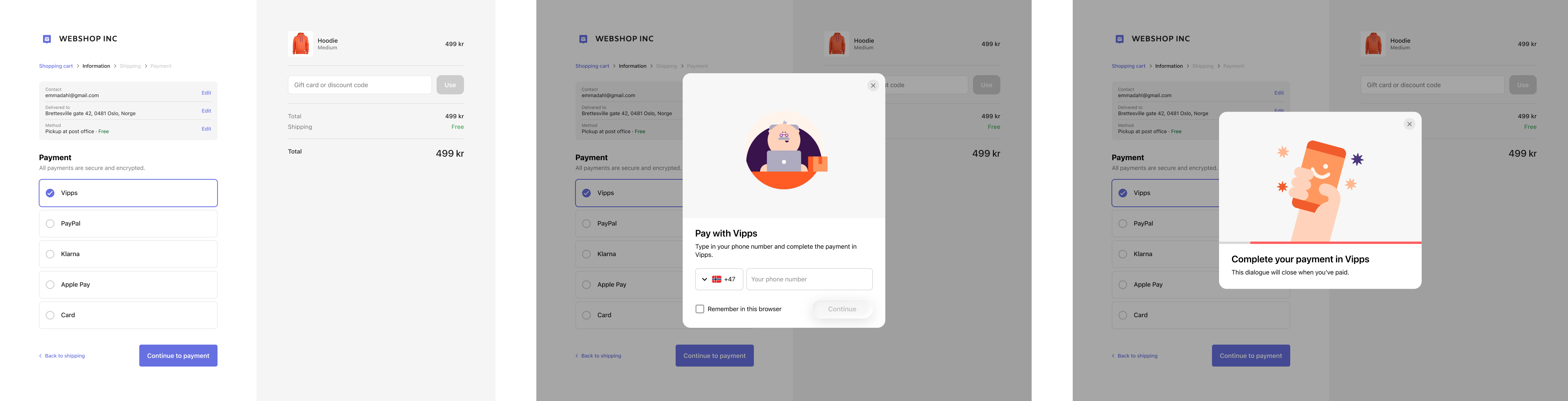
Screenshot: Checkout page with Vipps selected as the payment method, showing a dialog with a phone number entry step and a prompt to open the Vipps app to complete the payment.
Online payment flow for PSPs
- Customer selects Vipps or MobilePay at checkout.
- PSP initiates the payment via the ePayment API with card passthrough and a card callback URL.
- ePayment API returns a redirectUrl and payment reference to the PSP.
- PSP handles the app switch with the redirectUrl. We recommend using the Widget SDK for this.
- ePayment API requests the payment in the customer's Vipps or MobilePay app.
- Customer selects a card and clicks pay.
- Webhooks API sends the merchant's system an aborted or expired event if the customer does not accept the payment.
- Merchant's system gets the payment from the ePayment API, as a backup if the webhook is delayed or missed.
- ePayment API returns the current state of the payment.
- If the payment was aborted or expired, the customer is returned to the checkout page and the flow ends.
- If the customer accepts the payment, the ePayment API sends the card token to the PSP's card callback URL.
- PSP processes the payment in its own acquiring systems and responds to the callback with a reserve status within 20 seconds.
- PSP displays the order confirmation at the return URL.
- PSP sends the capture status to the ePayment API, so the customer sees it as captured in the app.
Create an Express payment
The merchant's sales unit must be approved to use the Express feature. PSPs must ensure their merchants have obtained this approval before enabling Express payments. To request access, the merchant should contact their key account manager, their partner manager, or customer service.
For a visual walkthrough of the customer's experience, see How the ePayment PSP API works with Express
With Express, the user selects shipping options and shares their profile inside the app. Then the PSP's psp.callbackUrl is called with the card token to process.
To enable Express, add the following to your payment creation request, POST:/epayment/v1/payments:
paymentMethod.typeset toCARD_PASSTHROUGHpspobject with your server URL specified in thecallbackUrlfieldprofile.scopemust include"address". Also include every other scope you need to deliver the order, usuallyname email phoneNumber address.shipping: eitherfixedOptionsordynamicOptions— for full details, see Shipping options- Other required parameters as mentioned above
Note that amount is the base product price. Vipps MobilePay adds the selected shipping cost before the user confirms.
Example request (PSP and Express-specific fields are highlighted):
curl -X POST https://apitest.vipps.no/epayment/v1/payments \
-H "Content-Type: application/json" \
-H "Psp-Id: YOUR-PSP-ID" \
-H "Authorization: Bearer YOUR-ACCESS-TOKEN" \
-H "Ocp-Apim-Subscription-Key: YOUR-SUBSCRIPTION-KEY" \
-H "Merchant-Serial-Number: YOUR-MSN" \
-H "Idempotency-Key: YOUR-IDEMPOTENCY-KEY" \
-H "Vipps-System-Name: acme" \
-H "Vipps-System-Version: 3.1.2" \
-H "Vipps-System-Plugin-Name: acme-webshop" \
-H "Vipps-System-Plugin-Version: 4.5.6" \
-d '{
  "amount":{
    "currency":"NOK",
    "value":6000
    },
    "customer":{
        "phoneNumber":"4712345678"
    },
    "paymentMethod": {
      "type": "CARD_PASSTHROUGH"
    },
    "psp": {
      "pspReference": "payment-ref-1234567",
      "callbackUrl": "https://example.com/psp-callback",
      "allowedCardTypes": ["VISA_DEBIT", "VISA_CREDIT", "ELEC_DEBIT", "DANKORT", "MC_CREDIT", "MC_DEBIT"],
      "publicEncryptionKeyId": "3f1c2e90-7a4b-4c9d-8f21-6b3e2d7a91c4"
    },
    "profile": {
        "scope": "name email phoneNumber address"
    },
  "shipping": {
    "fixedOptions": [
        {
            "isDefault": true,
            "priority": 0,
            "type": "PICKUP_POINT",
            "brand": "POSTNORD",
            "options": [
                {
                    "id": "meny_grunerlokka",
                    "isDefault": true,
                    "amount": {
                        "currency": "NOK",
                        "value": 3900
                        },
                    "priority": 0,
                    "name": "Meny Grünerløkka",
                    "meta": "Henrik Ibsens Gate 1, 0000 Oslo",
                    "estimatedDelivery": "In 2 days"
                },
                {
                    "id": "bunnpris_skoyen",
                    "isDefault": false,
                    "amount": {
                        "currency": "NOK",
                        "value": 3900
                        },
                    "name": "Bunnpris Skøyen",
                    "priority": 1,
                    "meta": "Gatenavn 21, 0001 Oslo",
                    "estimatedDelivery": "In 2 days"
                }
            ]
        }
        ]
    },
  "reference": "acme-shop-123-order123abc",
  "userFlow": "WEB_REDIRECT",
  "returnUrl": "https://developer.vippsmobilepay.com/docs/example-pages/result-page/",
  "paymentDescription": "Purchase of socks"
}'
When the user confirms the payment in the Vipps MobilePay app and selects their card, Vipps MobilePay sends a card
token to your psp.callbackUrl. See Card callback for the request format, HMAC authentication,
and expected response.
Once you've processed the payment, update payment status so that the Vipps MobilePay app will show the user the correct status.
Shipping and user details
After authorization, retrieve shippingDetails and userDetails from GET:/epayment/v1/payments/{reference} (include the Psp-Id header).
You can also get this information through the ePayment webhook payload.
The shippingDetails object provides information about the shipment:
address- An object that holds the recipient's shipping address, including:addressLine1,addressLine2,city,country,postCode.shippingCost- The cost of shipping, specified in minor currency units. For example, 9900 (99.00 NOK).shippingOptionId- The ID of the selected shipping option.shippingOptionName- The name of the selected shipping option.
The userDetails object contains the profile information to which the user has given consent.
For example:
"shippingDetails": {
    "address": {
        "addressLine1": "BOKS 6300, ETTERSTAD",
        "addressLine2": "",
        "city": "OSLO",
        "country": "NO",
        "postCode": "0603"
    },
    "shippingCost": 0,
    "shippingOptionId": "posten2",
    "shippingOptionName": "Postibutikk"
},
"userDetails": {
    "email": "test.user@example.com",
    "firstName": "Test",
    "lastName": "User",
    "mobileNumber": "4712345678",
    "addresses": [
        {
            "addressLine1": "BOKS 6300, ETTERSTAD",
            "addressLine2": "",
            "city": "OSLO",
            "country": "NO",
            "postCode": "0603"
        },
        {
            "addressLine1": "Robert Levins gate 5",
            "addressLine2": "",
            "city": "Oslo",
            "country": "NO",
            "postCode": "0152"
        }
    ]
}
With this information, you have all you need to ship the package.
For full details on shipping options, dynamic callbacks, and button guidelines, see the Express feature guide.
Express flow for PSPs
- Customer clicks the Express button.
- PSP creates an Express payment via the ePayment API with card passthrough and shipping options.
- ePayment API returns a redirectUrl and payment reference to the PSP.
- PSP handles the app switch with the redirectUrl. We recommend using the Widget SDK for this.
- ePayment API requests the payment in the customer's Vipps or MobilePay app.
- Customer shares their address, selects a shipping option, and confirms the total amount.
- Webhooks API sends the merchant's system an aborted or expired event if the customer does not accept the payment.
- Merchant's system gets the payment from the ePayment API, as a backup if the webhook is delayed or missed.
- ePayment API returns the current state of the payment, including the shipping details and the user details.
- If the payment was aborted or expired, the merchant returns the customer to the page they started from, and the flow ends.
- If the customer accepts the payment, the ePayment API sends the card token to the PSP's card callback URL.
- PSP processes the payment in its own acquiring systems and responds to the callback with a reserve status within 20 seconds.
- PSP gets the shipping details and profile information from the ePayment API.
- PSP fulfills and ships the order.
- PSP sends the capture status to the ePayment API, so the customer sees it as captured in the app.
Create an in-person payment
For a visual walkthrough of the customer's experience, see How the ePayment PSP API works in person
For in-person payments, the merchant enters the customer's phone number in the POS system, and Vipps MobilePay sends a push notification directly to the customer's app.
Send a POST:/epayment/v1/payments request with the required parameters, and:
paymentMethod.typeset toCARD_PASSTHROUGHuserFlowset toPUSH_MESSAGE, which sends a push notification directly to the customercustomer.phoneNumberset to the customer's phone number"customerInteraction": "CUSTOMER_PRESENT"(required by regulation for in-person payments)pspobject with your server URL specified in thecallbackUrlfield
Example request (PSP-specific fields are highlighted):
curl -X POST https://apitest.vipps.no/epayment/v1/payments \
-H "Content-Type: application/json" \
-H "Psp-Id: YOUR-PSP-ID" \
-H "Authorization: Bearer YOUR-ACCESS-TOKEN" \
-H "Ocp-Apim-Subscription-Key: YOUR-SUBSCRIPTION-KEY" \
-H "Merchant-Serial-Number: YOUR-MSN" \
-H "Idempotency-Key: YOUR-IDEMPOTENCY-KEY" \
-d '{
  "amount": {
    "currency": "DKK",
    "value": 49800
  },
  "customer": {
    "phoneNumber": "4512345678"
  },
  "paymentMethod": {
    "type": "CARD_PASSTHROUGH"
  },
  "psp": {
    "pspReference": "payment-ref-1234567",
    "callbackUrl": "https://example.com/psp-callback",
    "allowedCardTypes": ["VISA_DEBIT", "VISA_CREDIT", "ELEC_DEBIT", "DANKORT", "MC_CREDIT", "MC_DEBIT"],
    "publicEncryptionKeyId": "3f1c2e90-7a4b-4c9d-8f21-6b3e2d7a91c4"
  },
  "reference": "acme-shop-123-order123abcd",
  "userFlow": "PUSH_MESSAGE",
  "returnUrl": "https://example.com/redirect?orderId=15122022",
  "paymentDescription": "Payment to Butikken",
  "customerInteraction": "CUSTOMER_PRESENT"
}'
The customer gets a push notification, opens their Vipps or MobilePay app, selects a stored card, and confirms
the payment. Vipps MobilePay then sends a card token to your psp.callbackUrl. See Card callback
for the request format, HMAC authentication, and expected response.
Once you've processed the payment, register it in the POS system and update the payment status so that the Vipps MobilePay app shows the customer the correct status.
In-person payment flow for PSPs
- PSP adds the products to the sale in the POS system.
- Customer provides their phone number.
- Merchant's system or PSP initiates the payment via the ePayment API with card passthrough and a push message user flow.
- ePayment API sends the customer a push message requesting payment.
- Customer selects a card and clicks pay.
- Webhooks API sends the merchant's system an aborted or expired event if the customer does not accept the payment.
- Merchant's system gets the payment from the ePayment API, as a backup if the webhook is delayed or missed.
- ePayment API returns the current state of the payment.
- If the payment was aborted or expired, the merchant's system releases the sale in the POS and the flow ends.
- If the customer accepts the payment, the ePayment API sends the card token to the PSP's card callback URL.
- PSP processes the payment in its own acquiring systems and responds to the callback with a reserve status within 20 seconds.
- PSP confirms the payment in the POS and completes the sale.
- PSP sends the capture status to the ePayment API, so the customer sees it as captured in the app.
Create a QR payment
For a visual walkthrough of the customer's experience, see How one-time payment QRs work for PSPs
For QR payments, the customer scans a dynamic QR code shown on a screen (for example, a vending machine or point of sale) using their Vipps or MobilePay app.
Send a POST:/epayment/v1/payments request with the required parameters, and:
paymentMethod.typeset toCARD_PASSTHROUGHuserFlowset toQR(optionally specifyqrFormat.format, andqrFormat.sizefor PNG)"customerInteraction": "CUSTOMER_PRESENT"(required by regulation, since the customer is present)pspobject with your server URL specified in thecallbackUrlfield
Since the customer scans the QR from their own phone, you don't need to supply a phone number.
Example request (PSP-specific fields are highlighted):
curl -X POST https://apitest.vipps.no/epayment/v1/payments \
-H "Content-Type: application/json" \
-H "Psp-Id: YOUR-PSP-ID" \
-H "Authorization: Bearer YOUR-ACCESS-TOKEN" \
-H "Ocp-Apim-Subscription-Key: YOUR-SUBSCRIPTION-KEY" \
-H "Merchant-Serial-Number: YOUR-MSN" \
-H "Idempotency-Key: YOUR-IDEMPOTENCY-KEY" \
-d '{
  "amount": {
    "currency": "DKK",
    "value": 42924
  },
  "paymentMethod": {
    "type": "CARD_PASSTHROUGH"
  },
  "customerInteraction": "CUSTOMER_PRESENT",
  "reference": "acme-shop-123-order123abcd",
  "userFlow": "QR",
  "returnUrl": "https://example.com/redirect?orderId=15122022",
  "paymentDescription": "Ear buds",
  "psp": {
    "pspReference": "payment-ref-1234567",
    "callbackUrl": "https://example.com/psp-callback",
    "allowedCardTypes": ["VISA_DEBIT", "VISA_CREDIT", "ELEC_DEBIT", "DANKORT", "MC_CREDIT", "MC_DEBIT"],
    "publicEncryptionKeyId": "3f1c2e90-7a4b-4c9d-8f21-6b3e2d7a91c4"
  },
  "qrFormat": {
    "format": "IMAGE/PNG",
    "size": 1024
  }
}'
Display the QR on a screen facing the customer. The customer scans the QR code and is directed to the Vipps or
MobilePay app, where they select a stored card and confirm the payment. Vipps MobilePay then sends a card token
to your psp.callbackUrl. See Card callback for the request format, HMAC authentication, and
expected response.
Once you've processed the payment, update payment status so that the Vipps MobilePay app will show the user the correct status.
For QR code generation options, see ePayment Features: Payment through a QR.
One-time payment QR flow for PSPs
- Customer selects their products.
- Merchant's system requests a payment via the ePayment API with card passthrough and a QR user flow.
- ePayment API returns the one-time payment QR to the merchant's system.
- Merchant's system displays the one-time QR on a screen facing the customer.
- Customer scans the QR, selects a card, and confirms the payment.
- Webhooks API sends the merchant's system an aborted or expired event if the customer does not accept the payment.
- Merchant's system gets the payment from the ePayment API, as a backup if the webhook is delayed or missed.
- ePayment API returns the current state of the payment.
- If the payment was aborted or expired, the merchant's system removes the QR and releases the cart in the POS, and the flow ends.
- If the customer accepts the payment, the ePayment API sends the card token to the PSP's card callback URL.
- PSP processes the payment in its own acquiring systems and responds to the callback with a reserve status within 20 seconds.
- PSP confirms the payment in the POS and completes the sale.
- PSP sends the capture status to the ePayment API, so the customer sees it as captured in the app.
Get payment information
To get information about a payment (including shipping details for Express):
Supply the Psp-Id header.
Example request:
curl -X GET https://apitest.vipps.no/epayment/v1/payments/PAYMENT-REFERENCE-ID \
-H "Psp-Id: YOUR-PSP-ID" \
-H "Authorization: Bearer YOUR-ACCESS-TOKEN" \
-H "Ocp-Apim-Subscription-Key: YOUR-SUBSCRIPTION-KEY" \
-H "Merchant-Serial-Number: YOUR-MSN" \
For a sequence of events, see: GET:/epayment/v1/payments/{reference}/events.
See ePayment API guide: Get payment details for more information.
Update payment status
These endpoints do not move any money. Capture, refund, and cancel all happen in your own PSP and acquirer systems. You call these endpoints afterwards to tell us what has already happened, so the payment state we hold, and what the customer sees in the Vipps MobilePay app, matches your records.
Because a CARD_PASSTHROUGH sales unit is configured for PSP use, these requests bypass the financial operation
they would normally trigger at Vipps MobilePay, and only update the status of the payment.
Send each request once the corresponding operation has succeeded in your systems, and include your PSP identifier
in the Psp-Id header.
POST:/epayment/v1/payments/{reference}/capture- Use this when the payment has been captured in your systems. We register that the payment has been captured, and the app shows the payment as captured to the customer.
POST:/epayment/v1/payments/{reference}/refund- Use this when the payment has been refunded in your systems. We register that the payment has been refunded.
POST:/epayment/v1/payments/{reference}/cancel- Use this when remaining authorized funds are canceled in your systems, or to prevent the user from completing a payment that has not yet been authorized. We cancel the payment in the Vipps MobilePay app.
Webhooks
You can receive instant notifications about payment events, such as authorizations and cancellations, instead of polling for status. Webhooks work the same way for PSPs as for other ePayment API integrations.
See the ePayment API guide: Webhooks for how to register a webhook, the list of event types, and the webhook payload format.
The rest of this section covers what is specific to PSPs.
Register across all your sales units
Omit Merchant-Serial-Number from the registration request to register a
partner/PSP webhook. It covers every sales unit you
manage, including sales units created later, so you don't have to register per merchant:
curl -X POST https://apitest.vipps.no/webhooks/v1/webhooks \
-H "Authorization: Bearer YOUR-ACCESS-TOKEN" \
-H "Ocp-Apim-Subscription-Key: YOUR-SUBSCRIPTION-KEY" \
--data '{
    "url": "YOUR-CALLBACK-URL",
    "events": [
        "epayments.payment.authorized.v1",
        "epayments.payment.aborted.v1",
        "epayments.payment.expired.v1"
    ]
}'
Include Merchant-Serial-Number instead to register for a single sales unit. For a partner/PSP webhook, the
registration limits count per PSP ID rather than per MSN,
and they aren't counted against the merchant's own limits.
Subscribe to every outcome, not just authorization
A payment has four possible endings, and the merchant's system has to react to all of them:
| Event | What happened | Typical follow-up |
|---|---|---|
epayments.payment.authorized.v1 | The customer selected a card and authorized. | Complete the sale. |
epayments.payment.aborted.v1 | The customer canceled in the app. | Release the cart. |
epayments.payment.expired.v1 | The customer didn't pay before the deadline. | Release the cart. |
epayments.payment.terminated.v1 | You canceled before authorization. | Release the cart. |
Subscribing to authorized alone leaves an unattended screen showing a payment request that can no longer be
completed, so subscribe to aborted and expired as well. See
Payment states for what each state means. Note
that epayments.payment.cancelled.v1 is a different case: it means a payment the customer already authorized was
canceled afterwards.
Route each event to the right sales unit and payment
The webhook payload includes msn and
reference. A partner/PSP webhook delivers events for all the sales units you manage to the same URL, so use msn
to identify the merchant and reference to identify the payment. The pspReference in a webhook is not the same
value as in the API response, see
Understanding pspReference.
Authenticate the event and answer quickly
Store the secret returned when you register, and use it to
authenticate every webhook event before acting on it.
Respond within 10 seconds. If your server responds with 4xx or 5xx, or doesn't respond in time, the event is
retried with a growing delay for up to 7 days, so the same
event can reach you more than once. Make the handler idempotent, keyed on reference and the event name.
Don't rely on webhooks alone
Set a timeout that fits the flow, and start polling
GET:/epayment/v1/payments/{reference} if no webhook
arrives before it. Follow the polling guidelines.
Errors
PSP requests use the same error format as the rest of the ePayment API: an RFC 7807 response body, with domain-specific error codes in extraDetails. Card passthrough payments can also return the PSP-specific error code 4160 (invalid payment method type for CARD_PASSTHROUGH).
See the ePayment API guide: Error handling for the full list of error codes, rate limits, and troubleshooting guidance.
Card callback
The card callback applies to:
- ePayment PSP API: creating a payment
- Recurring PSP API: agreement sign-up and payment source updates
The flow works like this:
- The PSP sends Vipps MobilePay an API request to initiate an ePayment or Recurring request.
- Vipps MobilePay presents the request to the user in the app.
- If the user approves and selects their card, Vipps MobilePay sends a
POSTrequest to the callback URL specified in the initial request:psp.callbackUrl. - The PSP must process the card data and respond within 20 seconds, or the request will fail.
How the callback works:
- The callback is synchronous — your endpoint must respond with the payment authorization result.
- If you respond with a retryable error, the user can retry with the same or a different card.
- HTTP 500 errors and timeouts are treated as non-retryable.
If you need to whitelist our servers, find details on the servers page.
Callback request
Request body
The callback we send to your server contains the following properties:
pspReference: Your unique reference for this payment, as provided in thepspobject when creating the payment (ePayment) or the agreement (Recurring).authorizationAttemptId: Unique identifier for this authorization attempt.merchantSerialNumber: The merchant serial number for the payment.amount: Object containing the payment amount:value: The amount in minor units.currency: The three-letter ISO 4217 currency code.
softDeclineCompletedRedirectUrl: URL to redirect to after a soft decline is resolved.cardInfo: Object containing the card details:maskedCardNumber: The masked card number (for example,47969485XXXX1234).cardType: The card type, using the same values asallowedCardTypes(for example,VISA_DEBIT).cardIssuedInCountryCode: The ISO 3166-1 alpha-2 country code where the card was issued.cardDataType: The type of card data included in the callback. Possible values areTOKENorPAN. See Token vs encrypted PAN.networkToken: Object containing the network token details whencardDataTypeisTOKEN:number: The token number.cryptogram: The cryptogram for the transaction.expiryMonth: Token expiry month.expiryYear: Token expiry year.tokenType: Token network type (for exampleVISA).eci: Electronic Commerce Indicator.paymentAccountReference: Stable reference across token renewals.
encryptedPan: Encrypted PAN whencardDataTypeisPAN.
The callback body is plain JSON — no decryption is needed to read it. Use HMAC authentication to verify that the callback is genuine before processing it.
An example request body containing a token:
{
  "pspReference": "7686f7788898767977",
  "authorizationAttemptId": "d8f9a1d7-b9d3-4c2f-b5c2-7d8b93df12ab",
  "merchantSerialNumber": "123456",
  "amount": {
    "value": 1000,
    "currency": "DKK"
  },
  "softDeclineCompletedRedirectUrl": "https://vipps.no/mobileintercept?transactionId=123456789&responsecode=OK",
  "cardInfo": {
    "maskedCardNumber": "47969485XXXX1234",
    "cardType": "VISA_DEBIT",
    "cardIssuedInCountryCode": "DK",
    "cardDataType": "TOKEN",
    "networkToken": {
      "number": "5000000000000000001",
      "cryptogram": "AAAAAAAAAAAAAAA=",
      "expiryMonth": "03",
      "expiryYear": "2030",
      "tokenType": "VISA",
      "eci": "7",
      "paymentAccountReference": "AAAAAAAAAAAAAAAAAAAAAAAAAAAAA"
    },
    "encryptedPan": null
  }
}
If you requested an encrypted PAN and one is available, encryptedPan will be populated instead of networkToken:
{
  "pspReference": "7686f7788898767977",
  "authorizationAttemptId": "731C95C5-7E8B-40C3-A6EA-713B24694E6E",
  "merchantSerialNumber": "123456",
  "softDeclineCompletedRedirectUrl": "https://vipps.no/mobileintercept?transactionId=123456789&responsecode=OK",
  "cardInfo": {
    "maskedCardNumber": "47969485XXXX1234",
    "cardType": "VISA_DEBIT",
    "cardIssuedInCountryCode": "DK",
    "cardDataType": "PAN",
    "encryptedPan": "fsfnsdjkfbgdft34895u7345"
  },
  "amount": {
    "value": 1000,
    "currency": "DKK"
  }
}
You must decrypt encryptedPan using your RSA private key to obtain the card number. See Token vs encrypted PAN for details.
HMAC authentication
To verify that the callback originates from us and has not been tampered with, we sign each callback using HMAC with a shared secret.
The shared secret is your PSP client secret.
Use the shared secret together with the Host, x-ms-date, x-ms-content-sha256, and Authorization headers of the request.
How HMAC works
- Secret key: A secret key is shared between the sender and the receiver.
- Message: The message to be authenticated.
- Hash function: A cryptographic hash function such as SHA-256 is used.
- HMAC generation:
- The message and the secret key are combined in a specific way.
- The combined data is hashed using the cryptographic hash function.
- The result is the HMAC value.
- Verification:
- The receiver uses the same secret key and hash function to generate an HMAC value for the received message.
- The receiver compares the generated HMAC value with the HMAC value sent with the message.
- If they match, the message is verified as authentic and unaltered.
You will receive an HTTP POST with this format:
POST https://example.com/psp-makepayment

Host: example.com
x-ms-date: Thu, 30 Mar 2023 08:38:32 GMT
x-ms-content-sha256: MeydvsFI1Iw70/ebjHpmChQiaV087peWSdrG6WVX9WE=
Authorization: HMAC-SHA256 SignedHeaders=x-ms-date;host;x-ms-content-sha256&Signature=IaGZ6XqHCtcwSSKoHo6+nyjjSWB8HBjGa8Cch4PxAz8=
X-Vipps-Authorization: HMAC-SHA256 SignedHeaders=x-ms-date;host;x-ms-content-sha256&Signature=IaGZ6XqHCtcwSSKoHo6+nyjjSWB8HBjGa8Cch4PxAz8=
Content-Type: application/json

{"pspReference":"7686f7788898767977","authorizationAttemptId":"3030303thisisaguid","merchantSerialNumber":"123456"}
X-Vipps-Authorization contains the same value as Authorization. You can verify either header, but they should match when both are present.
-
Check that the content has not been modified
Hash the exact request body as UTF-8 using SHA-256, then base64 encode it. This hash must match the
x-ms-content-sha256header. Use the raw body exactly as received. Re-serializing the JSON may change whitespace and produce a different hash. -
Verify the authentication header
Concatenate the request method, path and query, date, host, and content hash in this format:
POST\n<pathAndQuery>\n<date>;<host>;<hash>The
hostvalue must match theHostheader, including the port if one is present.Please note the use of
\nnot\r\n.Sign the string with HMAC-SHA256 using your shared secret. This must match the
Signaturepart of theAuthorizationheader.
Sample code
- JavaScript
- .Net C#
'use strict';

const assert = require('node:assert');
const { describe, it } = require('node:test');
const crypto = require('crypto');

describe('Sample code', () => {
    it('Verifying card callback HMAC headers', () => {
        const secret = 'AAAAAAAAAAAAAAAAAAAAAAAAAAAAAAAAAAAAAAAAAAAAAAAAAAAAAAAAAAAAAAAAAAAAAAAAAAAAAAAAAAAAAA==';

        const request = {
            method: 'POST',
            url: 'https://example.com/psp-makepayment',
            pathAndQuery: '/psp-makepayment',
            headers: {
                'Host': 'example.com',
                'x-ms-date': 'Thu, 30 Mar 2023 08:38:32 GMT',
                'x-ms-content-sha256': 'MeydvsFI1Iw70/ebjHpmChQiaV087peWSdrG6WVX9WE=',
                'Authorization': 'HMAC-SHA256 SignedHeaders=x-ms-date;host;x-ms-content-sha256&Signature=IaGZ6XqHCtcwSSKoHo6+nyjjSWB8HBjGa8Cch4PxAz8=',
                'X-Vipps-Authorization': 'HMAC-SHA256 SignedHeaders=x-ms-date;host;x-ms-content-sha256&Signature=IaGZ6XqHCtcwSSKoHo6+nyjjSWB8HBjGa8Cch4PxAz8='
            },
            content: '{"pspReference":"7686f7788898767977","authorizationAttemptId":"3030303thisisaguid","merchantSerialNumber":"123456"}'
        };

        const expectedContentHash = crypto
            .createHash('sha256')
            .update(request.content, 'utf8')
            .digest('base64');

        assert.equal(
            request.headers['x-ms-content-sha256'],
            expectedContentHash,
            'Content hash was not valid');

        const expectedSignedString =
            `${request.method}\n` +
            `${request.pathAndQuery}\n` +
            `${request.headers['x-ms-date']};${request.headers['Host']};${request.headers['x-ms-content-sha256']}`;

        const expectedSignature = crypto
            .createHmac('sha256', secret)
            .update(expectedSignedString, 'utf8')
            .digest('base64');

        const expectedAuthorization =
            `HMAC-SHA256 SignedHeaders=x-ms-date;host;x-ms-content-sha256&Signature=${expectedSignature}`;

        assert.equal(expectedAuthorization, request.headers.Authorization, 'Authorization was not valid');
        assert.equal(request.headers['X-Vipps-Authorization'], request.headers.Authorization, 'Headers did not match');
    });
});
using System.Security.Cryptography;
using System.Text;

public class SampleCode
{
    public void Verifying_Card_Callback_Hmac_Headers()
    {
        var secret = "AAAAAAAAAAAAAAAAAAAAAAAAAAAAAAAAAAAAAAAAAAAAAAAAAAAAAAAAAAAAAAAAAAAAAAAAAAAAAAAAAAAAAA==";

        var request = new
        {
            Method = "POST",
            Url = "https://example.com/psp-makepayment",
            PathAndQuery = "/psp-makepayment",
            Headers = new Dictionary<string, string>
            {
                { "Host", "example.com" },
                { "x-ms-date", "Thu, 30 Mar 2023 08:38:32 GMT" },
                { "x-ms-content-sha256", "MeydvsFI1Iw70/ebjHpmChQiaV087peWSdrG6WVX9WE=" },
                {
                    "Authorization",
                    "HMAC-SHA256 SignedHeaders=x-ms-date;host;x-ms-content-sha256&Signature=IaGZ6XqHCtcwSSKoHo6+nyjjSWB8HBjGa8Cch4PxAz8="
                },
                {
                    "X-Vipps-Authorization",
                    "HMAC-SHA256 SignedHeaders=x-ms-date;host;x-ms-content-sha256&Signature=IaGZ6XqHCtcwSSKoHo6+nyjjSWB8HBjGa8Cch4PxAz8="
                }
            },
            Content = """{"pspReference":"7686f7788898767977","authorizationAttemptId":"3030303thisisaguid","merchantSerialNumber":"123456"}"""
        };

        var contentHashInBytes = SHA256.HashData(Encoding.UTF8.GetBytes(request.Content));
        var expectedContentHash = Convert.ToBase64String(contentHashInBytes);
        Assert.Equal(expected: expectedContentHash, actual: request.Headers["x-ms-content-sha256"]);

        var expectedSignedString =
            $"{request.Method}\n" +
            $"{request.PathAndQuery}\n" +
            $"{request.Headers["x-ms-date"]};{request.Headers["Host"]};{request.Headers["x-ms-content-sha256"]}";

        using var hmacSha256 = new HMACSHA256(Encoding.UTF8.GetBytes(secret));
        var hmacSha256Bytes = Encoding.UTF8.GetBytes(expectedSignedString);
        var hmacSha256Hash = hmacSha256.ComputeHash(hmacSha256Bytes);
        var expectedSignature = Convert.ToBase64String(hmacSha256Hash);
        var expectedAuthorization = $"HMAC-SHA256 SignedHeaders=x-ms-date;host;x-ms-content-sha256&Signature={expectedSignature}";

        Assert.Equal(expected: expectedAuthorization, actual: request.Headers["Authorization"]);
        Assert.Equal(expected: request.Headers["Authorization"], actual: request.Headers["X-Vipps-Authorization"]);
    }
}
Token vs encrypted PAN
By default, the card callback includes a card token and cryptogram, covering the vast majority of Visa and Mastercard cards.
A small number of cards (~0.1%) are not tokenizable — primarily the Danish Dankort rail, but occasionally individual Visa or Mastercard issuers. Provide a publicEncryptionKeyId to receive an encrypted PAN for these cards; without it, those payments will fail.
Encrypted PAN setup and handling
To enable encrypted PAN, you must:
-
Onboard a public encryption key with us.
The RSA public key should be provided as
X.509 SubjectPublicKeyInfo(using ASN.1 DER Encoding) represented in PEM encoding (use PEM file extension). The public key must have a length of 4096 bits. You must clearly state your PSP name in the file name. Naming template for public key:{integratorname}-{environment}-public- Example:
company-prod-public
Please send the public keys in a ZIP-file. We will register the keys and supply you with a
PublicKeyIdto be used when initiating payments.Please note that if a public key is unused for 6 months, we will delete it. If this happens, you must supply a new public key.
- Example:
-
Pass the resulting
publicEncryptionKeyIdin thepspobject when creating the payment or the agreement.
The encryptedPan is encrypted using RSA/NONE/OAEPWithSHA256AndMGF1Padding (SHA-256 is also used for padding). Once decrypted, the structure looks like this:
{"timestampticks":123456789123456789,"encryptedCardData": { "cardNumber": 1234567812345678, "expiryMonth": 12, "expiryYear": 28 }}
Always process the payment using the card type specified in the cardType field. This is the only way we can offer card type picking for co-branded cards in accordance with PSD2 requirements. If you process a PAN where cardType is DANKORT as a Visa transaction, the SCA will be missing and an unwanted 3DS step-up is likely to occur. PAN-based transactions are not regarded as authenticated — handle them according to your acquirer's scheme rules for SCA compliance.
Most Dankort cards are co-branded as Visa/Dankort, supporting both a tokenizable Visa flow and a PAN-based Dankort flow. If you include DANKORT in allowedCardTypes and provide a publicEncryptionKeyId, the Dankort rail will be available. Use the preferVisaPartOfVisaDankort flag to route co-branded cards through the Visa rail instead.
To process tokens only, omit publicEncryptionKeyId and remove DANKORT from allowedCardTypes — standalone Dankort cards are not tokenizable.
Callback response
You must return a valid callback response within 20 seconds or the operation will fail.
Respond with HTTP 200 OK and a JSON body with the following properties:
status(required): The payment authorization result. One of:RESERVE- The authorization succeeded, and the amount was reserved.SOFT_DECLINE- Additional cardholder action is required to complete the authorization. IncludesoftDeclineUrl.FAIL- The authorization failed. IncludeerrorCodeanderrorMessage.
networkTransactionReference: Your reference for the network transaction. Include this when the authorization succeeded and you have such a reference.softDeclineUrl: URL the user should be redirected to in order to complete a soft decline flow. Required whenstatusisSOFT_DECLINE.errorCode: Numeric error code describing why the authorization failed. Required whenstatusisFAIL.errorMessage: Human-readable description of the failure. Required whenstatusisFAIL.
The following examples show what the response body should look like for each status value.
Use RESERVE when the authorization succeeded and the payment should remain reserved for a later capture.
{
  "networkTransactionReference": "123456789",
  "status": "RESERVE"
}
Use SOFT_DECLINE when the cardholder must complete an additional issuer or authentication step before the payment can proceed.
{
  "status": "SOFT_DECLINE",
  "softDeclineUrl": "https://example.com"
}
Use FAIL when the authorization did not succeed and no soft decline flow is available.
{
  "status": "FAIL",
  "errorCode": 300,
  "errorMessage": "Refused by Issuer"
}
When you respond with status: FAIL, use one of the following errorCode values:
errorCode | Name | Retryable | Description |
|---|---|---|---|
100 | Card Error | Yes | Card-related failure where the card should not be retried unchanged for this payment. |
200 | Insufficient Funds | Yes | The card or account does not have enough available funds to complete the payment. |
210 | Limit Exceeded | Yes | A card, account, or issuer limit has been reached, so the payment cannot be authorized. |
300 | Issuer Declined | Yes | The issuer declined the payment without providing a more specific reason. |
400 | Permanent Decline | No | A hard decline where the payment must not be retried. |
500 | Risk Declined | Yes | The payment was blocked by fraud or risk controls. |
600 | Temporary Technical Error | Yes | A transient PSP, issuer, or network problem prevented the authorization attempt from completing. |
700 | Merchant Configuration Error | No | The payment failed because of merchant, PSP, or transaction configuration issues. |
800 | Duplicate or In Progress | No | The payment is already being processed, or a duplicate attempt was detected, so retrying immediately is not allowed. |
900 | Unknown Error | Yes | The authorization failed, but the reason could not be mapped confidently to a more specific error. |
If we receive a FAIL response, we will allow the user to retry with the same or a new payment source unless the errorCode maps to a non-retryable failure.
If there is a timeout or HTTP 500, the payment cannot be tried again by the user. You will need to initiate a new payment request.
Strong Customer Authentication
Under card scheme rules, the issuer can require an extra authentication step — a soft decline, or "step-up". You must support a 3-D Secure fallback so these payments can complete; otherwise soft-declined payments will fail.
Soft decline flow
When your authorization attempt is soft declined, you host the 3-D Secure session and hand us a URL to show the user. We open it in the app, and once the user has completed the step-up we call you back a second time to finish the authorization.
-
In your response to the card callback, set
statustoSOFT_DECLINEand provide asoftDeclineUrlpointing to your hosted 3-D Secure session. -
We open
softDeclineUrlin a web view in the Vipps MobilePay app, and the user completes the step-up. -
When the step-up is finished, redirect the user to the
softDeclineCompletedRedirectUrlthat we included in the original card callback request. This signals us that the session is done. -
We send you a second card callback for the same selected card. The
authorizationAttemptIdis the same as in the first callback, so you can recognize it as a soft decline retry. For tokenized cards, this callback contains a fresh token cryptogram for the new authorization attempt. -
You complete the authorization using:
- the 3-D Secure authentication result from the completed step-up, and
- the card data from the second callback.
Respond with
RESERVEif the authorization succeeded orFAILif it did not. We relay this result to the user.
If the step-up fails, the user can retry the payment, which starts a new authorization attempt.
Soft decline (3-D Secure step-up) flow
- The user selects a card and confirms the payment in the Vipps MobilePay app.
- Vipps MobilePay sends the card token to the PSP's psp.callbackUrl.
- The PSP attempts authorization and the issuer requires a step-up.
- The PSP responds with status SOFT_DECLINE and a softDeclineUrl.
- Vipps MobilePay opens the softDeclineUrl in a web view in the app.
- The user completes the 3-D Secure step-up hosted by the PSP.
- The PSP redirects the user to the softDeclineCompletedRedirectUrl from the original callback.
- The app notifies Vipps MobilePay that the step-up is complete.
- Vipps MobilePay sends a second card callback with the same authorizationAttemptId and a fresh token cryptogram.
- The PSP completes the authorization using the 3-D Secure result and the card data from the second callback, and responds with RESERVE or FAIL.
- Vipps MobilePay shows the payment result to the user.
More information
- ePayment API guide — More examples and details for using these endpoints.
- ePayment API spec — the full technical specification for all endpoints, including required fields, data types, and valid formats