How the Recurring PSP API works
How subscription agreement sign-up and charging work for PSPs using card passthrough with the Recurring API.
There are three main flows: agreement sign-up, charge creation, and payment source update.
Agreement sign-up
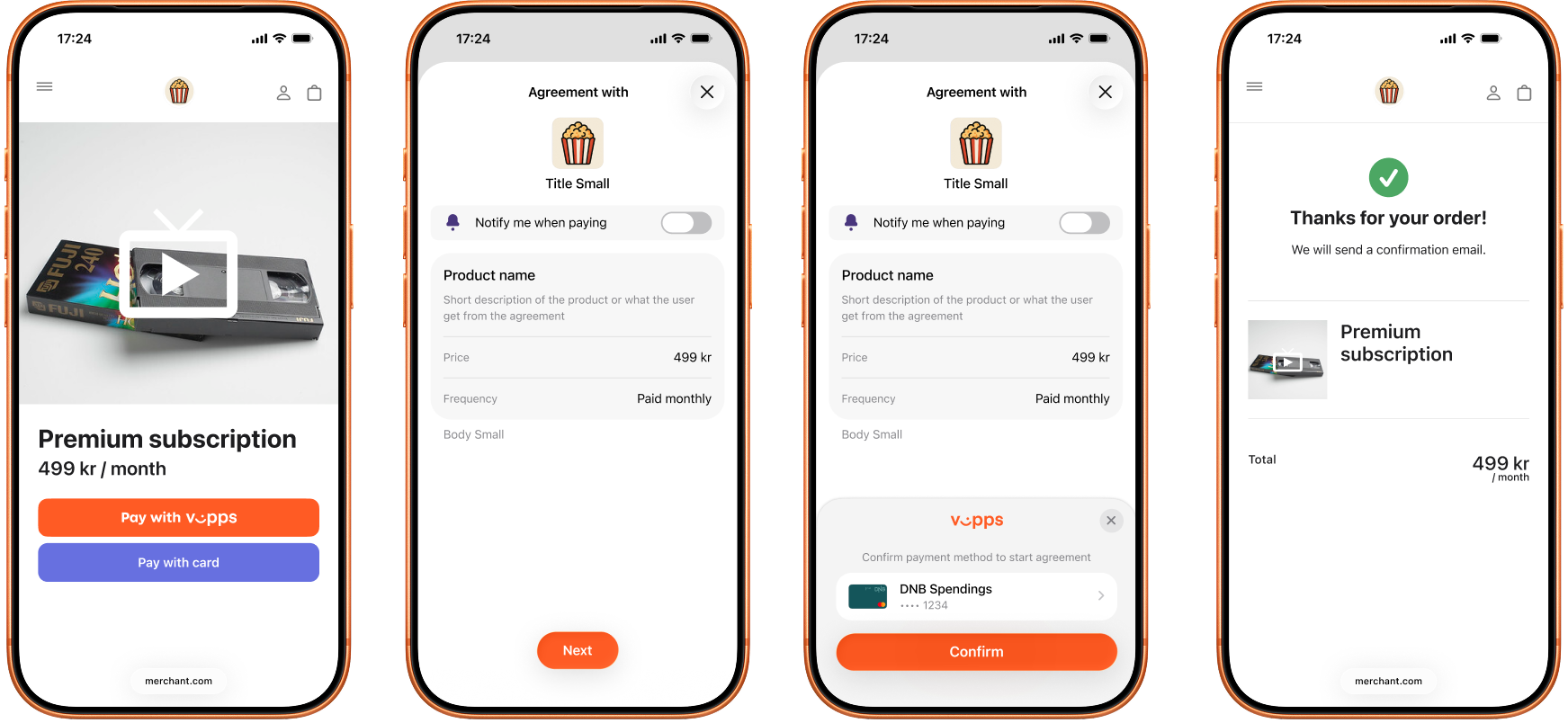
Screenshot: Payment agreement sign-up flow — screen 1: merchant website shows a "Premium subscription" with a Pay with Vipps button; screen 2: the app (Vipps or MobilePay) displays an "Agreement with" the merchant showing the product name, frequency, and a "Notify me when paying" toggle, with a Next button; screen 3: the same agreement screen with a payment method confirmation sheet showing the selected card and a Confirm button; screen 4: the merchant website shows an order confirmation with a summary of the Premium subscription.
1. Customer selects a subscription
On the merchant's website or app, the customer chooses to subscribe and pay with Vipps or MobilePay.
2. The PSP drafts an agreement
The PSP drafts an agreement with POST:/recurring/v3/agreements, including the cardPassthrough object with a cardCallbackUrl. An optional initialCharge sets the upfront payment amount — if omitted, a zero-amount verification is performed instead. See Agreement sign-up for the full request details.
The request must include the Merchant-Serial-Number header for the merchant/sales unit the PSP is operating on behalf of. Use the merchant's MSN, not the PSP's own MSN.
3. Customer opens the Vipps or MobilePay app
If the agreement was initiated on a mobile device, the Vipps or MobilePay app opens automatically.
 or MobilePay
  app opens automatically.
If initiated on a desktop device, the landing page opens. The customer enters their phone number and the agreement request is sent to their phone.
4. Customer selects a card and approves the agreement
The customer reviews the agreement terms, selects a card stored in their Vipps or MobilePay app, and confirms.
5. Vipps MobilePay sends the card token to the PSP
Vipps MobilePay posts the card token to the PSP's cardCallbackUrl. The PSP processes the CIT (Customer-Initiated Transaction) and responds within 20 seconds to confirm the agreement. See Card callback.
6. The customer is redirected and the agreement is active
The customer is redirected to the merchant's merchantRedirectUrl and sees a confirmation. The PSP can now start creating charges according to the agreement terms.
Charge creation
Charge creation is PSP-initiated — there is no user interaction. The PSP submits a batch of charges against active agreements, obtains the card data for each charge, processes the payments, and reports each outcome back to update the charge status. How the card data is delivered depends on the charge type: it is returned at creation for UNSCHEDULED charges, but fetched on the due date via Get payment info for scheduled RECURRING charges.
- The PSP submits a batch of charges with
POST:/recurring/v4/agreements/charges. The request must include theMerchant-Serial-Numberheader for the merchant the PSP is creating charges for. Each charge is validated and created independently. - Vipps MobilePay returns a response split into
successfulCharges,failedCharges, andretryableCharges. For each successfulUNSCHEDULEDcharge, the response includes the card data needed for downstream processing: a network token if available, otherwise an encrypted PAN (only whenpublicEncryptionKeyIdis set on the agreement).RECURRINGcharges are createdDUEfor a future date and do not include card data in this response. Retry items inretryableChargeswith the sameagreementIdandchargeId. - For a
RECURRINGcharge, on the due date the PSP fetches the current card data withGET:/recurring/v4/agreements/{agreementId}/charges/{chargeId}/payment-info.UNSCHEDULEDcharges skip this step — they already have card data from step 2. - The PSP processes each payment using its own acquiring infrastructure.
- For each charge, the PSP reports the outcome with
POST:/recurring/v4/agreements/{agreementId}/charges/{chargeId}/result:SUCCESSfor a successfully processed payment, orFAILEDwith anerrorobject for a failed payment. ForRECURRINGcharges, Get payment info must have been called first. Without reporting the result, the charge stays unresolved and the user sees a due or overdue charge they cannot act on.
See Charge creation for the full flow and request details.
Payment source update
When a user changes their card on an existing agreement in the app, Vipps MobilePay sends a zero-amount CIT to the PSP's cardCallbackUrl to verify the new card. The flow is identical to the card callback in agreement sign-up — no action is needed from the merchant's website.
See Payment source update for more details.
More information
- For technical details, see the Recurring PSP API guide
- For more agreement and charge flow examples, see How the Recurring API works