Overview of the settlement process
Install AI tools
Give your assistant up-to-date guidance for our APIs, with our plugin or without it.
The plugin is still under development. See the AI tools page for details.
- Claude Code
- Cursor
- Codex
- Without installing
Run both commands, in order.
claude plugin marketplace add vippsas/agent-toolkit
claude plugin install vipps-developer@agent-toolkit
Open Settings, then Plugins.
Add vippsas/agent-toolkit as a plugin marketplace, then install the "vipps-developer" plugin.
For the app, add the marketplace "vippsas/agent-toolkit" and then install "vipps-developer". For the CLI, run the following commands.
codex plugin marketplace add vippsas/agent-toolkit
codex plugin add vipps-developer@agent-toolkit
Paste this into any assistant.
Read https://github.com/vippsas/agent-toolkit/blob/main/plugins/vipps-developer/README.md for Vipps MobilePay integration guidance.
For troubleshooting, see the full instructions.
Merchants using Vipps MobilePay receive the money for their sales in bulk bank transfers (settlements), usually one per day. It is therefore necessary to download a specification report that explains the bulk bank transfer, so it can be correctly filed in the merchant's accounting system. Such reports can be fetched either on the business portal or by using this API.
Usually, you will wish to implement a reconciliation process, where you download a report from Vipps MobilePay each day, and check that the contents of the report match the data you have on your own side. We recommend that you do this by matching per transaction on transaction IDs.
This guide will focus on using this API, but may also be useful reading for those who rely on using reports from the business portal for their reconciliation processes.
The exact details of the settlement process (e.g., the delay before the money is received) are subject to the agreement between the merchant and Vipps MobilePay. Please see the general Vipps MobilePay Settlements description for more information.
Ledger transactions and balances
We don't transfer money to/from the merchant for every payment made. Instead, all transactions are put on a ledger that tracks the funds that we owe the merchant. During the day, transactions occur that usually increase, and sometimes decrease, the balance the merchant has in Vipps MobilePay. Periodically (daily/weekly/monthly depending on configuration), the balance of the ledger is paid out to a configured account number and the balance is reset.
The following illustration shows an example day at a low-traffic merchant.
Captures (sales) and refunds are added to the
ledger, changing the balance of funds that Vipps MobilePay owes the merchant.
At the end of the day, we deduct some fees and the remaining balance
is paid out. The payout is itself an entry on the ledger,
adjusting the balance down to zero.
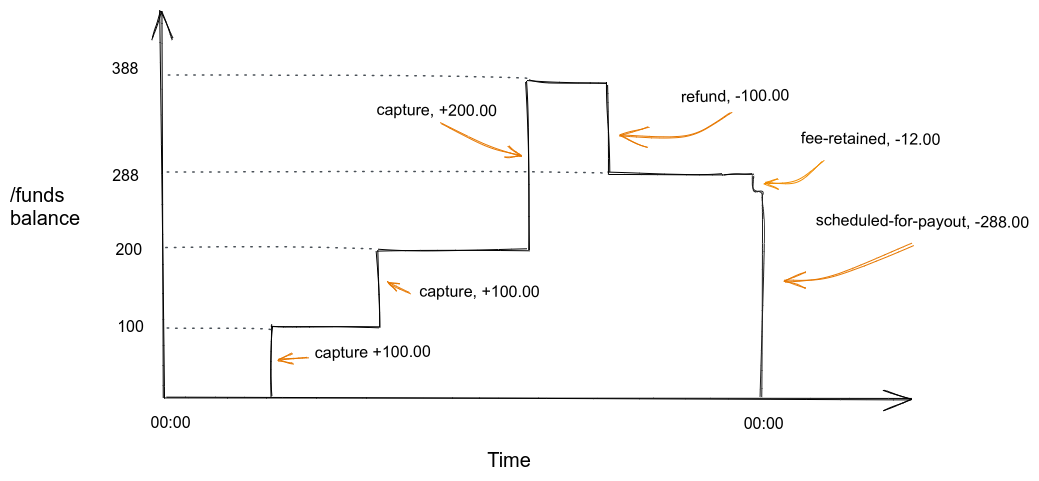
Image: A step-chart graph of /funds balance over time within a single day. Three capture events raise the balance in steps, then a refund and a fee-retained entry reduce it slightly, and finally a scheduled-for-payout entry drops the balance back to zero at day's end.
This example may look as follows if the data returned from
GET:/report/v2/ledgers/12345/funds/dates/2025-10-01 is displayed
as a table:
ledgerDate | entryType | amount | reference | pspReference | recipientHandle | time | balanceBefore | balanceAfter |
|---|---|---|---|---|---|---|---|---|
| 2025-10-01 | capture | 10000 | purchase-12 | 3343121302 | NO:57860 | 2025-10-01T16:33:00.824993+0200 | 0 | 10000 |
| 2025-10-01 | capture | 10000 | purchase-12 | 3334234112 | NO:57860 | 2025-10-01T18:37:55.982497+0200 | 10000 | 20000 |
| 2025-10-01 | capture | 20000 | purchase-14 | 3259823497 | NO:57860 | 2025-10-01T19:12:54.932428+0200 | 20000 | 40000 |
| 2025-10-01 | refund | -10000 | purchase-12 | 1154320987 | NO:57860 | 2025-10-01T23:47:59.984224+0200 | 40000 | 30000 |
| 2025-10-01 | fees-retained | -1200 | 01H7W7Q6Y5R-3G58CTAZX0MHKV2 | 2025-10-02T00:00:00.000000+0200 | 30000 | 28800 | ||
| 2025-10-01 | payout-scheduled | -28800 | Vipps utbet. 2000023 Vippsnr 57860 | 12345-2000023 | 2025-10-02T00:00:00.000000+0200 | 28800 | 0 |
Where the data is of these types:
ledgerDate- Date for which the transactions occurred, in YYYY-MM-DD format.entryType- The type of transaction. See Entry type reference for a description.amount- Amounts are specified in minor units. For NOK and DKK that means 1 kr = 100 øre (example: 499 kr = 49900 øre). For EUR, it's cents.recipientHandle- Identification of the sales unit that this payment was made to/from. Contains a country code and ID, separated by a colon (':').time- The date and time of the transaction. These are presented together with an offset (difference from UTC time in hours).balanceBefore- Amounts are specified in minor units. For NOK and DKK that means 1 kr = 100 øre (example: 499 kr = 49900 øre). For EUR, it's cents.balanceAfter- Amounts are specified in minor units. For NOK and DKK that means 1 kr = 100 øre (example: 499 kr = 49900 øre). For EUR, it's cents.reference- The merchant's reference for the entry (see Entry type reference for more details)pspReference- Vipps MobilePay's reference for the entry (see Entry type reference for more details)
Monetary values returned from the endpoint are in cents/øre.
This example shows:
- Three sales captures minus one refund brings the daily total to 300.00.
- The sum of fees for the captures, 12.00, is retained by Vipps MobilePay.
- The remaining balance of 288.00 being scheduled for payout. The actual payout may not happen for several days, reflecting delays in the bank networks, and subject to the merchant's agreement with Vipps MobilePay. Once the payout is scheduled, the money is gone from the ledger balance.
Above, only the total fees for the settlement period are included.
If you require further specification of the fees charged, these are available from
the GET:/report/v2/ledgers/{ledgerId}/{topic}/dates/{ledgerDate} endpoint,
where {topic} is fees.
Continuing from the example above, this may be the result of a call to
GET:/report/v2/ledgers/12345/fees/dates/2025-10-01:
ledgerDate | entryType | amount | reference | pspReference | recipientHandle | time | balanceBefore | balanceAfter |
|---|---|---|---|---|---|---|---|---|
| 2025-10-01 | capture-fee | -400 | purchase-12 | 3343121302 | NO:57860 | 2025-10-01T16:33:00.824993+0200 | 0 | -400 |
| 2025-10-01 | capture-fee | -400 | purchase-12 | 3334234112 | NO:57860 | 2025-10-01T18:37:55.982497+0200 | -400 | -800 |
| 2025-10-01 | capture-fee | -400 | purchase-14 | 3259823497 | NO:57860 | 2025-10-01T19:12:54.932428+0200 | -800 | -1200 |
| 2025-10-01 | fees-retained | 1200 | 12345-2000321 | 2025-10-02T00:00:00.000000+0200 | -1200 | 0 |
Note that:
pspReferencecan be used to correlate betweenfundsandfees.- Note that, while each
captureshown for the topic offundshas a uniquepspReference, it is possible to have several fees onfeesrelated to the samepspReference. - A
capture-feeentry is not guaranteed to have the sameledgerDateas the capture it belongs to. Correlate the two onpspReference, not onledgerDate. See Fee delay.
- Note that, while each
- The
fees-retainedentry will always appear at the same time on both endpoints and have opposing signs (money is moved from thefundsaccount and put on thefeesaccount).
In general, for both fees and funds, it is important to
be prepared for new entry types. The full reference of entry types is on the Entry type reference page,
but new types can be added to the API later without prior warning.
Complicating factors and account diagram
While the above is a sufficient example of the "happy day" settlement process, there are some possible complicating factors.
Net vs gross settlements
Fees for the services from Vipps MobilePay can be charged in two ways:
- Net settlements - The fees are retained from the settlement
payouts. The
fees-retainedentry is used to settle the fees, as shown in the example above. - Gross settlements - The fees are invoiced. In this case, there
is no mention of the fees in the funds account, while on the fees account,
a
fees-invoicedentry indicates that an invoice has been sent for the fees.
Payout delay
Settlement payouts are not done instantly, but after a certain
delay. The length of this delay varies depending on the agreement between the merchant
and Vipps MobilePay. For instance, if it is agreed to pay out money at "T+2",
then assuming the capture/sale is done on Monday, the money is paid to the merchant
on Wednesday. However, the report about what payout is planned on Wednesday
is already available on Tuesday morning. This is indicated by payout-scheduled
in the example above.
The payout can in some cases be blocked. One example
of this happening is if the merchant changes their bank account, and they need
to prove the ownership of the new bank account. In such cases, executing the payouts
is delayed until the problem blocking the payout is resolved;
but payout-scheduled entries are still being generated. When the problem is resolved,
all the previously scheduled transfers will be executed, one by one.
Fee delay
Fees are handled by a pipeline that is deliberately decoupled from the one handling funds and payouts, so a problem with fees never blocks a payout. When a fee is delayed, the payout is made as planned and the fee is placed on the next ledger date instead. This is most likely for captures made close to the cutoff for the business day, and normally means a delay of minutes or hours. If a fee has still not appeared after the next ledger date, please contact customer service.
For merchants on net settlements, the fees-retained amount on such a day does not
equal the sum of the fees for that day's captures. The delayed fee is retained later.
Correlate a capture with its fees on pspReference, and group all entries for the same
payment on reference. Do not pair them on ledgerDate.
Negative balance
If the sum of refunds and fees is larger than the sum of captures, the balance of the ledger can become negative. For example, consider a concert that sells tickets months in advance, and that this money is continuously paid out on a daily basis. Then, if the concert is cancelled and all tickets refunded, all of that money is refunded at once, likely leading to a negative balance.
If a balance is negative for too long, an invoice will be sent to the merchant.
This will lead to a top-up entry on the funds ledger (either when the invoice
is sent or when it is paid; details may vary).
Account diagram
To correctly model these complicating factors, we can use the following account diagram:
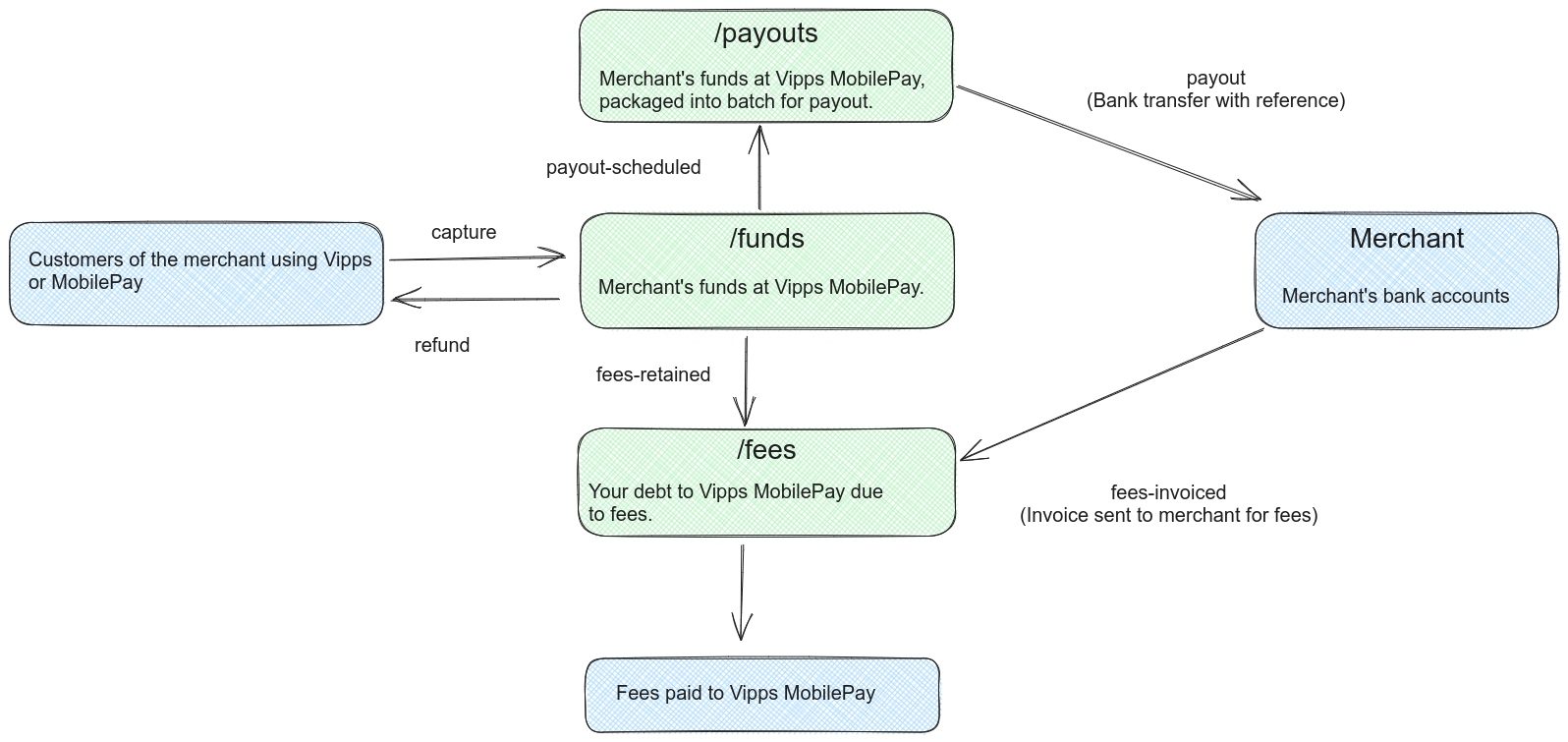
Flow diagram: Three accounts — /funds, /payouts, and /fees — connected by labeled directional arrows. Customers trigger captures into /funds and refunds out of /funds. The /funds account feeds /payouts via a payout-scheduled arrow, and payouts transfer to the merchant's bank account. Fees are either retained from /funds into /fees, or invoiced to the merchant directly, and are ultimately paid to Vipps MobilePay.
Note that:
- When sales (captures) happen, the balance of the funds account is increased. Refunds decrease the balance of the funds account.
- As fees are charged throughout the day, they are deducted from the fees account.
- Fees are settled in one of two ways:
- i) They are transferred from the funds account to the fees account, or
- ii) They are invoiced to the merchant
- Periodically, the funds account is packaged/batched and scheduled for payout.
This is indicated in the figure with a transfer to the payouts account,
where money is waiting to be paid out.
- If there are any problems with paying the money out (such as, the bank account
of the merchant was closed), the money will stay in the payouts account.
In particular, the funds account will contain
payout-scheduledeven if the actual payout did not succeed. If money does not arrive within the agreed-upon delay, please contact customer service.
- If there are any problems with paying the money out (such as, the bank account
of the merchant was closed), the money will stay in the payouts account.
In particular, the funds account will contain
The topics available at the
GET:/report/v2/ledgers/{ledgerId}/{topic}/dates/{ledgerDate}
are:
- The
fundstopic reports on the funds account. - The
feestopic reports on the fees account. - There is currently no endpoint to report on payouts, but we hope to add this in the future.
We recommend that the merchant's accounting system reflects the structure above:
- An account for fees owed to Vipps MobilePay.
- An account for funds stored at Vipps MobilePay.
- When sales are made, book the income towards this account.
- A settlement payout from Vipps MobilePay is simply a transfer between two funds accounts, both belonging to the merchant.
Related pages
- Fetching report data — How to call the endpoints, handle paging, and poll for new data.
- Entry type reference — Descriptions of every entry type in the
fundsandfeesledgers. - Settlements — General settlement information from the knowledge base.