App flow recommendations
This guide covers app flow recommendations for payment integrations. For login flows from a mobile app, see the Login API mobile app flows guide.
Universal links are required because they offer enhanced security, cross-platform compatibility, and automatic fallback handling.
If you believe deep links are necessary for your integration, please contact us before proceeding: developer@vippsmobilepay.com
If the checkout runs web content (a website, a PWA, or a hybrid app such as Cordova, Ionic, or React Native with WebView), the Widget SDK gives you a ready-made, on-brand payment button from a single script include, already wired to start the payment: no redirect logic, dialog handling, or design upkeep on your side. It opens the Vipps MobilePay app on mobile and tablet, and shows a payment dialog on desktop instead of sending the customer through a full-page redirect, so they never leave the checkout. If you only want the on-brand button and prefer to wire up the payment yourself, use the Button generator instead.
- Vipps
- MobilePay
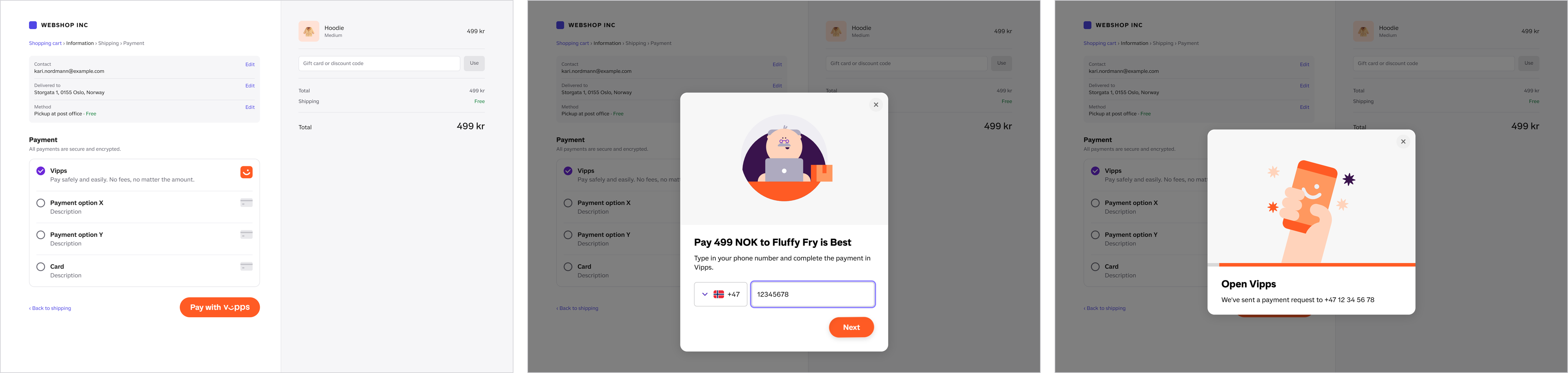
Screenshot: Checkout page with Vipps selected as the payment method, showing a dialog with a phone number entry step and a prompt to open the Vipps app to complete the payment.
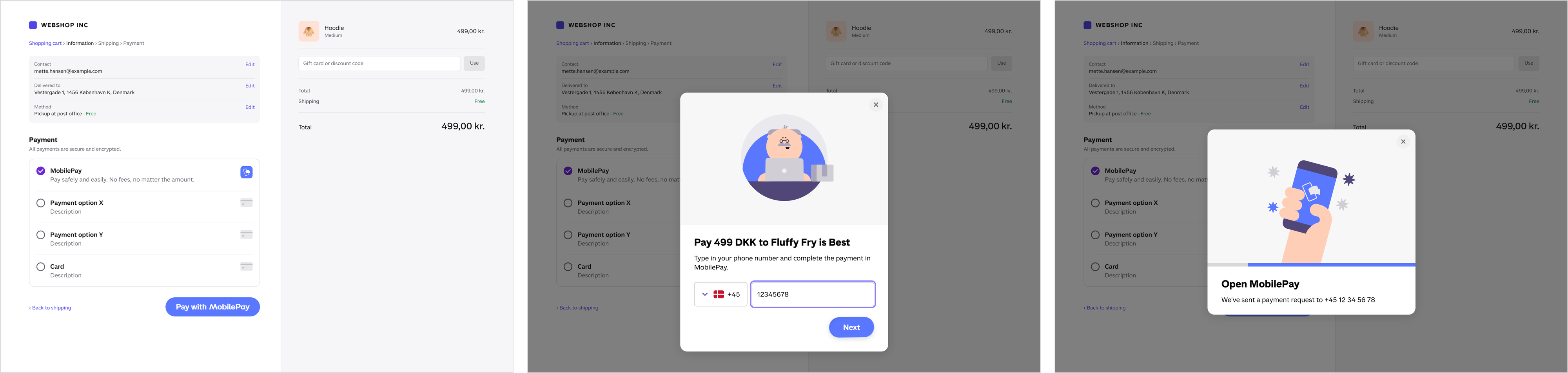
Screenshot: Checkout page with MobilePay selected as the payment method, showing a dialog with a phone number entry step and a prompt to open the MobilePay app to complete the payment.
For a true native app (no WebView), neither JavaScript library applies. Use the static button assets from the official brand guidelines instead.
Universal links (strongly recommended)
Universal links help create a smoother user experience and typically lead to fewer integration issues over time.
Universal links are standard https:// URLs that the operating system recognizes as associated with the Vipps or MobilePay app.
On Android, these are technically known as digital asset links, but for simplicity, we’ll use the term universal links to refer to both Apple and Android platforms.
- Apple: Universal links documentation
- Android: Digital asset links documentation
How universal links work
When a user is redirected to an app link:
- On mobile with app installed: The OS recognizes the URL and automatically opens the Vipps or MobilePay app.
- On mobile without app: The URL opens the landing page in the browser where users can enter their phone number.
- On desktop: The URL opens the landing page where users can enter their phone number to complete payment on their mobile device.
Getting universal links from the API
Universal links are the default for most APIs:
- Recurring API: Universal links provided by default (omit
isAppor setisApp: false) - eCom API: Universal links provided by default (omit
isAppor setisApp: false) - ePayment API: Set
userFlow: WEB_REDIRECTin your request
Example response:
{
  "orderId": "acme-shop-123-order123abc",
  "url": "https://api.vipps.no/dwo-api-application/v1/deeplink/vippsgateway?v=2&token=eyJraWQiOiJqd3RrZXkiLC <truncated>"
}
Implementation guidelines
The most common mistake is breaking the automatic app-switch on mobile devices. Users on phones should always get the automatic app-switch and should never see the landing page.
How it works correctly:
When the app link URL is opened normally (e.g., user clicks a button that opens the URL), the phone's operating system recognizes it as belonging to Vipps MobilePay and automatically switches to the app for seamless payment confirmation.
What breaks the app-switch:
The automatic app-switch is blocked when the URL is opened in:
- Programmatic navigation from a React
useEffect,setTimeout, or any other code that runs without a direct user gesture - iframes
- Web views, such as
WKWebViewon iOS andWebViewon Android - In-app browser views on iOS (
SFSafariViewController) - Embedded browsers (Instagram, Facebook, LinkedIn, and similar)
Setting window.location.href is fine when it runs in the click handler, also after awaiting the call that creates
the payment. It only breaks when it runs outside the user's click, as in the first item above.
When the app-switch is blocked, users must manually enter their phone number, approve launching the app, and confirm the payment again — a tedious process that leads to poor user experience and lower conversion rates.
How to fix:
- Use native navigation instead of web redirects
- Open the URL from a click handler attached to the user's action (e.g., a button's
onClick), not from a render-time effect - Open URLs directly with the system's default handler
- Don't embed the payment flow in web views or iframes
Native apps (iOS and Android)
In a native app, hand the URL to the operating system with a single call. The operating system opens the Vipps or MobilePay app when it is installed, and the landing page in the default browser when it is not. You don't need an SDK for this.
- iOS
- Android
// In the Pay button's action, after your backend has created the payment
UIApplication.shared.open(redirectUrl)
In SwiftUI, openURL(redirectUrl) from the environment does the same.
// In the Pay button's click listener, after your backend has created the payment
startActivity(Intent(Intent.ACTION_VIEW, Uri.parse(redirectUrl)))
| Do | Don't |
|---|---|
Open the redirectUrl with UIApplication.open, SwiftUI openURL, or an ACTION_VIEW intent | Load it in a WKWebView or an Android WebView. The app never opens. |
| On Android, Chrome Custom Tabs also works | On iOS, open it in SFSafariViewController. The app never opens. |
Use the https:// URL exactly as returned for userFlow: WEB_REDIRECT | Build or open vipps:// URLs yourself. Other apps can register the same scheme. |
| Create the payment on your backend | Call the API from the app. Your API keys would ship inside it. |
| Get the result from your backend when the user comes back | Treat a visit to your return URL as proof of payment |
When Android opens the browser instead
Even with the app installed, Android opens the link in the browser when the app's link isn't verified on that device,
or when the user has turned off Open supported links for the app. The landing page then sends the user on to the
app, a few seconds later than a direct switch. Your integration can't change this, and the same ACTION_VIEW call
handles both cases.
Knowing whether the app opened (optional)
A plain open doesn't tell you which happened. To know, try the app first and fall back to the browser:
- iOS
- Android
let openedApp = await UIApplication.shared.open(redirectUrl, options: [.universalLinksOnly: true])
if !openedApp {
    await UIApplication.shared.open(redirectUrl) // landing page in Safari
}
val uri = Uri.parse(redirectUrl)
try {
    // Android 11 (API 30) and later: only an app, never a browser, may take the link
    startActivity(Intent(Intent.ACTION_VIEW, uri).addFlags(Intent.FLAG_ACTIVITY_REQUIRE_NON_BROWSER))
} catch (e: ActivityNotFoundException) {
    startActivity(Intent(Intent.ACTION_VIEW, uri)) // landing page in the browser
}
Getting the user and the result back
- Set
returnUrlto a universal link or App Link that your own app handles, so the Vipps or MobilePay app returns the user to your app. Don't use a custom URL scheme for it. - Don't depend on the return URL. Users often switch back to your app on their own, and the operating system may close your app while the user is in Vipps or MobilePay.
- Save the payment
referencebefore you open the URL. When your app comes back to the foreground, or starts again after being closed, ask your backend for the payment's status and show the result from that. - Your backend gets the status from the API or from webhooks. See also Return URLs and redirects.
Behavior if user doesn't have an active Vipps or MobilePay account
With universal links, if the user enters their phone number on the landing page, but doesn't have an active account (or doesn't meet the minimum age requirement), they receive an error message stating they cannot continue.
- Vipps
- MobilePay


Screenshot: Vipps MobilePay landing page showing a phone number validation error with a disabled Next button.
Deep links
Always use universal links when integrating Vipps MobilePay payments into your app.
If you believe deep links are necessary for your integration, please contact us before proceeding: developer@vippsmobilepay.com
Deep links use custom URL schemes (vipps://) for direct app-to-app switching.
Note that, in the test environment (MT), the URL scheme is vippsMT://.
We don't recommend deep links for most integrations because:
- They don't work on desktop
- They require manual error handling
- There's no fallback if the app isn't installed
WEB_REDIRECT(universal links) provides better security and compatibility
Use NATIVE_REDIRECT only if you have a native-only app with no web presence.
Your responsibilities
When using deep links, you are responsible for:
- Checking app availability: Verify the user can open
vipps://URLs before initiating the payment - Handling missing app: Provide clear error messages or redirect users to install the app
- OS version compatibility: Ensure the device meets minimum OS requirements (check help.vippsmobilepay.com)
- Embedded browser handling: Deep links don't work in embedded browsers (Instagram, Facebook, and similar apps)
How deep links work
When a user is redirected to a deep link:
- On mobile with app installed: The OS recognizes the URL and automatically opens the Vipps or MobilePay app.
- On mobile without app: Error message.
- On desktop: Error message.
Getting deep links from the API
To explicitly request deep links:
- Initiate payment or agreement:
- Recurring API: Set
isApp: truein your request - eCom API: Set
isApp: truein your request - ePayment API: Set
userFlow: NATIVE_REDIRECTin your request
- Recurring API: Set
- Receive a
vipps://URL in the response - Redirect user to the URL exactly as provided (do not modify)
- Vipps or MobilePay app opens automatically (may prompt for approval)
- User approves or rejects the payment/agreement and the flow continues as normal
Example response:
{
  "orderId": "acme-shop-123-order123abc",
  "url": "vipps://?token=eyJraWQiOiJqd3RrZXkiLCJhbGciOiJSUzI1NiJ9.eyJzdWIiO <truncated>"
}
The deep link URL must be identical to what was sent by Vipps MobilePay.
App download links
If the app is not installed, redirect users to download it:
- App store
- Google Play Store
MobilePay DK: https://apps.apple.com/us/app/mobilepay/id624499138
MobilePay FI: https://apps.apple.com/us/app/mobilepay/id768172577
Vipps: https://apps.apple.com/us/app/vipps/id984380185
MobilePay DK: https://play.google.com/store/apps/details?id=dk.danskebank.mobilepay
MobilePay FI: https://play.google.com/store/apps/details?id=fi.danskebank.mobilepay
Vipps: https://play.google.com/store/apps/details?id=no.dnb.vipps
API parameter reference
Quick reference for choosing between universal links and deep links:
| API | App link (recommended) | Deep link |
|---|---|---|
| ePayment | userFlow: WEB_REDIRECT | userFlow: NATIVE_REDIRECT |
| Recurring | isApp: false (or omit) | isApp: true |
| eCom | isApp: false (or omit) | isApp: true |