Payment overview
User experience
App payments
All Vipps MobilePay payments are completed through the Vipps or MobilePay app. Users authenticate with biometrics or PIN, and their registered cards are used for the payment with delegated Strong Customer Authentication (SCA) from the banks.
 or MobilePay
  app. Users authenticate
with biometrics or PIN, and their registered cards are used for the
payment with delegated Strong Customer Authentication (SCA) from the
banks.
app. Users authenticate
with biometrics or PIN, and their registered cards are used for the
payment with delegated Strong Customer Authentication (SCA) from the
banks.Push notifications
Push notifications must be active for users to receive payment requests in the app.
Push notifications are "best effort", and we can't guarantee that all push notifications arrive. It depends on services, networks, and other things outside our control.
If the Vipps or MobilePay app is already open and active when the push notification is received, the user must press the Send button and move to the payments screen to see the payment notification. The app isn't able to poll or discover the payment notification automatically.
The landing page
When an activity (i.e., payment, agreement, or login) is initiated on a device where the Vipps or MobilePay app isn't installed, users are directed to the landing page. They enter their phone number and then open the app on their phone to complete the request.
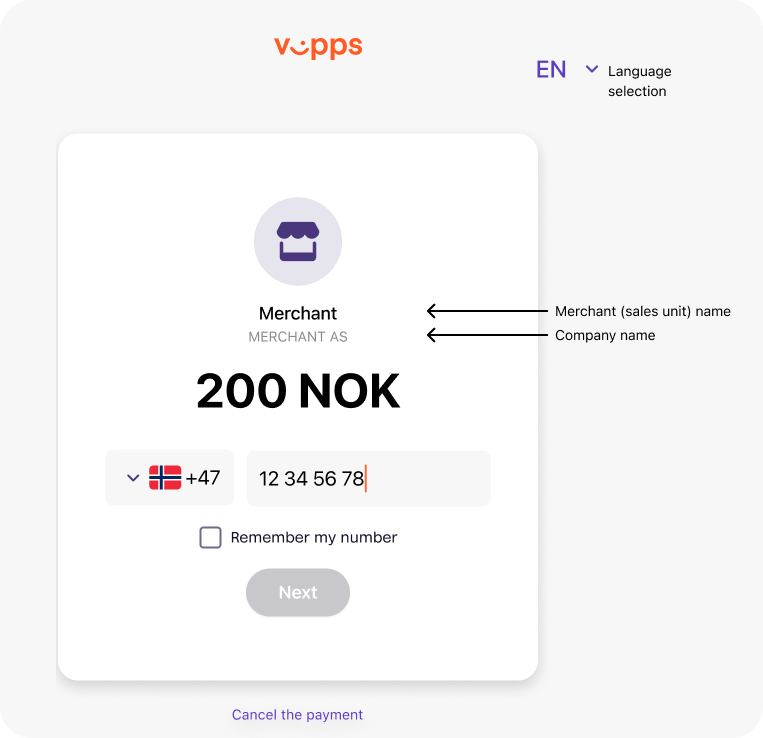
See Landing page for more details.
Return URLs
After completing a payment, users are redirected back to your website or app. The redirect behavior may vary depending on the browser used.
See Return URLs and redirects for implementation details and best practices.
Card payments
Both Visa and Mastercard are supported. This includes any cards that are co-branded with VISA and Mastercard.
Visa Electron is supported, if the card is enabled for online purchases.
To reduce risk, we do a 3D Secure step-up for all cards used for freestanding payments. This is because, when users are making freestanding payments, the delegated SCA that is used in the app isn't present. If the issuer does not handle 3D Secure correctly, the payment will fail.
Cards issued in the following countries are accepted:
- EEA/EØS (European Economic Area)
- Australia
- Canada
- Israel
- Japan
- New Zealand
- Republic of Korea
- Switzerland
- UK
- USA
Just to avoid confusion: Payments with the app are also done using the users' cards they have added there. The user gets all the benefits of the card, and since the app has delegated SCA, the user gets a faster and simpler user experience.
See Card payment deadlines may vary.
Strong customer authentication and 3-D Secure
We handle everything related to "soft declines" and 3-D Secure. We also handle BankID verification, when that is required. There is nothing a merchant needs to do.
We use delegated SCA (Strong Customer Authentication) from the banks, which significantly simplifies the user experience, as there is normally no need for BankID verification. The biometric login in the Vipps or MobilePay app is enough.
We use tokenized cards, which eliminates the need for "soft decline". As long as the token is valid, the user never has to verify the card again.
In order to prevent misuse and fraud, we require users to do a 3-D Secure verification if the user has paid more than 15 000 NOK during the last five days.
In short: Users paying with Vipps MobilePay have a much faster and simpler user experience than when using a card directly.
We also have an extremely low fraud rate, as it is impossible to pay with a card that has been invalidated in any way by the issuer. All users must log in to the app with their BankID verified identity to use their card.
Freestanding card payments
The ePayment API supports freestanding card payments: Users can enter their card details and pay directly with the card without using the Vipps or MobilePay app. This means that payments are possible also for users in countries where Vipps MobilePay is not yet available.
Restricting credit card payments
If you are not legally allowed to accept credit card payments, your sales unit can be configured to only accept payments from debit cards, so customers cannot pay with credit cards.
We can configure this for you. Contact us through help.vippsmobilepay.com.
Payment flow through the API
The general payment flow for a successful payment is as follows:
Payment flow
Each of these operations is described in this section.
Minimum payment amounts
The minimum amount for a payment transaction varies by API and currency.
- ePayment API: NOK 100 øre, DKK 1 øre, EUR 1 cent
- Recurring API: NOK 100 øre, DKK 1 øre, EUR 1 cent
- eCom API (Vipps only): NOK 100 øre
Payment guidelines and regulations
Please see:
Settlements
The business portal provides information about your transactions, sales units, and settlement reports. You can also subscribe to daily or monthly transaction reports by email.
Related pages:
Payment failures and troubleshooting
For information about why payments fail and how to troubleshoot, see HTTP response codes and errors, which covers:
- Business and user-related reasons for payment failures (expired cards, insufficient funds, etc.)
- Technical API errors and HTTP status codes
- Configuration errors
- General troubleshooting guidance