Login
Choose your login scenario:
- User-initiated - Customer initiates login from your website or mobile app
- Merchant-initiated - You trigger login using the customer's phone number (ideal for in-store enrollment)
Ready to build?
Use the Login API to implement either login scenario.
- Login from website/app ⭐
- Merchant-initiated login
Login from website or app
Let customers authenticate and share their profile information with your service using Vipps MobilePay instead of traditional usernames and passwords.
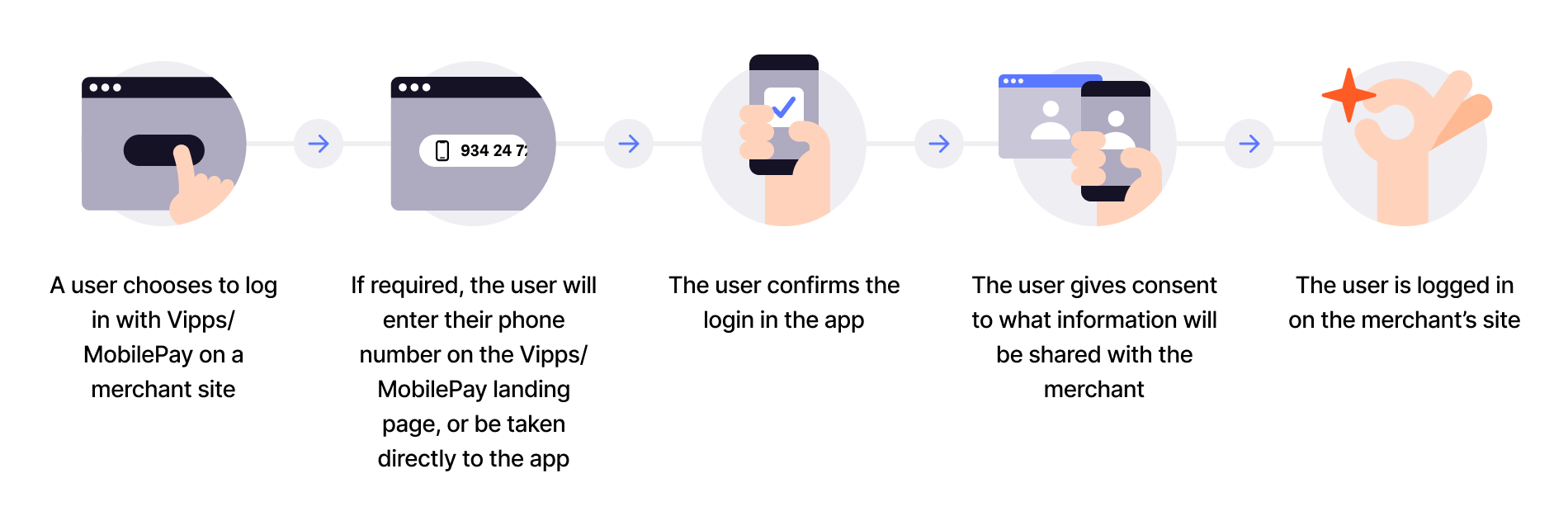
Flow diagram: 5-step login process. (1) User chooses to log in with Vipps or MobilePay on merchant site. (2) If required, user enters phone number on landing page or is taken directly to the app. (3) User confirms login in the app. (4) User gives consent to share information with the merchant. (5) User is logged in on the merchant's site.
- User initiates login - Customer clicks Log in with Vipps or Log in with MobilePay on your website or app.
- Authentication - On desktop, user enters phone number on landing page. On mobile, app-switch happens automatically.
- Confirm in app - User confirms login in the Vipps or MobilePay app (can choose to be remembered for faster future logins).
- Consent to share - User consents to share requested information (name, email, phone, address) with your service.
- User logged in - User is authenticated and returned to your site with their profile information.
If a user has previously logged in and chosen Remember me in browser, they can log in without opening the app on subsequent visits from the same browser.
View sequence diagram
Login flow from website
- User clicks "Log in with Vipps/MobilePay" on the merchant site.
- Merchant initiates a login request with the Login API.
- Login API redirects to the landing page or switches to the app.
- User enters their phone number if needed and opens the app.
- App prompts user to confirm login.
- User gives consent to share information.
- App returns the authorization code to the Login API.
- Login API redirects the user back to the merchant.
- Merchant exchanges the code for tokens with the Login API.
- Login API returns the access token and user info to the merchant.
- User is logged in.
Merchant-initiated login
Trigger a login flow directly on the customer's device using their phone number. Perfect for in-store customer enrollment and identity verification at point of sale.

Flow diagram: 5-step merchant-initiated login process. (1) Merchant initiates login based on user's phone number. (2) User gets a push notification and opens the app. (3) User confirms login in the app. (4) User gives consent to share information with the merchant. (5) User gets confirmation in the app or on merchant's site.
- Get phone number - Ask customer for phone number (verbally, manual entry, or scan their personal QR code).
- Initiate login - Send login request to the customer's device using the Login API.
- Push notification - Customer receives push notification and opens Vipps or MobilePay app.
- Confirm in app - Customer confirms login and consents to share information with your service.
- Complete enrollment - Customer is enrolled in your system with their verified information.
View sequence diagram
Merchant-initiated login flow
- Customer provides their phone number.
- Merchant initiates login with the customer's phone number via the Login API.
- Login API sends a push notification to the Vipps or MobilePay app.
- Customer opens the app and views the login request.
- App displays the consent screen to the customer.
- Customer confirms and gives consent.
- App returns the authorization code to the Login API.
- Merchant polls for completion and receives tokens from the Login API.
- Merchant retrieves user info from the Login API.
- Merchant enrolls the customer in the system.
Implementation resources
- Login API overview - Choose a login flow and find the main integration resources
- How it works: Login from mobile
- How it works: Login from desktop
- How it works: Merchant-initiated login
- Login API quick start - Make your first login integration
- Login API guide - Learn about scopes, tokens, and API features